> ## Documentation Index
> Fetch the complete documentation index at: https://docs.airmdr.com/llms.txt
> Use this file to discover all available pages before exploring further.
# Adaptive Security
> The Adaptive Security integration enables AirMDR to securely retrieve security-awareness and phishing-related information from Adaptive Security by using its Public API.
Adaptive Security provides programmatic access to resources such as users, groups, training campaigns, and phishing simulations for reporting and security workflows.
AirMDR authenticates to Adaptive Security by using an **API token** generated from the Adaptive Security Admin Portal. The token is supplied as a Bearer token when AirMDR sends API requests.
| Component | Supported configuration |
| :- | :- |
| Adaptive Security | Adaptive Security cloud platform |
| API | Adaptive Security Public API |
| API endpoint family | `/v2/*` |
| Authentication | API token / Bearer authentication |
| Transport | HTTPS |
| AirMDR credential | `Api_token` |
Adaptive Security is a cloud service rather than a locally installed product with traditional software-version requirements. Current published API resources use the `v2` endpoint family; for example, user information is available through `/v2/users`.
Always refer to the current Adaptive Security API documentation when validating individual endpoint availability because API resources can change independently of the AirMDR integration.
Adaptive Security uses **token-based authentication** for its Public API. Requests include the generated token in the HTTP `Authorization` header using the Bearer authentication scheme. [APIs.io](http://APIs.io)
```text theme={null}
Authorization: Bearer
```
**Credential Reference**
| Credential | Required | Description | Example |
| :- | :- | :- | :- |
| `Api_token` | Yes | API access token generated in the Adaptive Security Admin Portal | `***************` |
The actual token must be entered into AirMDR **without adding **`Bearer`** manually** unless the AirMDR field specifically requests it. AirMDR handles the authorization header when making requests.
**Token lifecycle**
The AirMDR connection configuration indicates that Adaptive Security tokens:
* can have an expiration date selected when they are created;
* can be revoked;
* become unusable after expiration; and
* cause authentication requests to fail when an expired or invalid token remains configured.
Public API specifications also describe Bearer-token authentication and token revocation/expiration behavior.
Adaptive Security states that access to its Public API is governed by **role-based access controls (RBAC)**.
Use an account that is permitted to generate API credentials and access the resources required by the integration.
Adaptive Security's publicly available documentation does not currently identify a specific built-in role name that must be assigned for AirMDR. Avoid documenting an unverified role such as "API Administrator." Instead, ensure that the account can access **Settings → API** and that the resulting token can access the required endpoints.
## Pre-requisites
>
> An active **Adaptive Security tenant** with Public API access.
>
>
>
> Access to **Adaptive Security Admin Portal** at`https://admin.adaptivesecurity.com`.
>
Copy the API token when it is generated. The AirMDR connection UI indicates that Adaptive Security displays the token only once.
## Setup Steps
1. Open a supported web browser.
2. Navigate to [https://admin.adaptivesecurity.com](https://admin.adaptivesecurity.com).
3. Sign in using an Adaptive Security administrator account.
From the Adaptive Security Admin Portal:
1. Open **Settings**.
2. Select **API**.
Use the following navigation path: `Settings → API`.
On the **API** page:
1. Select the option to create or generate an API token.
2. Enter the requested token information, if prompted.
3. Configure an appropriate **expiration** for the token.
4. Review the access configuration displayed in the Adaptive Security UI.
5. Generate the token.
Exact button names can change as Adaptive Security updates its Admin Portal. The verified navigation path is **Settings → API**.
6. Copy the generated API token.
Store it in an approved secrets-management system until it is added to AirMDR.
Do not add `Bearer`, quotation marks, or additional spaces.
For Example: ``
Never include an actual Adaptive Security token in documentation, Jira tickets, screenshots, email, Slack messages, or source-code repositories.
### Adaptive Security Credential Reference Table
| Credential / Field | Required | Where to obtain | Description | Example / Format |
| :- | :- | :- | :- | :- |
| **Api\_token** | Yes | Adaptive Security Admin Portal → **Settings → API** | API token used by AirMDR to authenticate requests to the Adaptive Security API. Enter only the generated token value. Do not include the `Bearer` prefix. | `` |
| **Remote Agent** | No | AirMDR → **Advanced Configuration** | Selects an AirMDR Remote Agent through which the Adaptive Security API requests are routed. Use this when direct connectivity from AirMDR is unavailable or your network architecture requires a Remote Agent. | `Remote Agent - Production` |
| **Expiry** | Recommended | Use the expiration date configured when the Adaptive Security API token is created | Records the token expiration date in AirMDR so administrators can track credential lifecycle and rotate the token before it becomes invalid. | `YYYY-MM-DD` |
### Validate Connectivity
You can optionally validate the credential before adding it to AirMDR.
Adaptive Security documents the following base URL: [https://api.adaptivesecurity.com](https://api.adaptivesecurity.com)
```json theme={null}
curl -X GET "https://api.adaptivesecurity.com/v2/users?page_size=1" \
-H "Authorization: Bearer " \
-H "Accept: application/json"
```
A successful request returns HTTP:
```text theme={null}
200 OK
```
If the token is invalid or expired, the API can return:
```text theme={null}
401 Unauthorized
```
## Configure Adaptive Security in AirMDR Integrations Dashboard
1. Navigate to [AirMDR](https://app.airmdr.com/auth/login), provide the credentials and click **Login**
2. Navigate to the AirMDR Integrations Dashboard in the left navigation pane and select **ADMIN → Integrations**.
3. Use the search option, enter the keyword "**Adaptive Security**", select the **Connections** tab, and click **+ New Connection** button.
4. Use the following values in the AirMDR integration configuration screen:
| Field | Required | Description | Example |
| :- | :- | :- | :- |
| **Instance** | Yes | Enter a unique and recognizable name for the Adaptive Security connection. | `Adaptive Security - Production` |
| **Organization** | Based on AirMDR configuration | Select the AirMDR organization that owns or uses the Adaptive Security connection. | `ASO - AirMDR System Organization` |
| **Description** | Yes | Enter a brief description that identifies the Adaptive Security environment or intended purpose of the connection. | `Adaptive Security production integration` |
| **Api\_token** | Yes | Paste the API token generated from **Adaptive Security → Settings → API**. | `` |
| **Remote Agent** | No | Select a Remote Agent when API communication must be routed through an AirMDR Remote Agent. | `Production Remote Agent` |
| **Expiry** | Recommended | Enter the expiration date associated with the Adaptive Security API token. | `2027-01-31` |
1. In **Remote Agent**, select an AirMDR Remote Agent only when the Adaptive Security tenant must be accessed through an approved private network route, proxy, or controlled network environment. If the Adaptive Security API is directly accessible from AirMDR over the public internet, leave this field unselected unless instructed otherwise by your AirMDR administrator.
2. In **Expiry**, select the date on which AirMDR should treat the stored Adaptive Security credentials as expired, according to your organization’s credential-rotation policy.
The **Expiry** date controls credential validity in AirMDR. It does not automatically rotate, extend, or revoke the API token in Adaptive Security. Generate a replacement token in Adaptive Security, update the AirMDR connection with the new **Api\_token**, validate the connection, and then revoke the previous token when it is no longer required.
5. Click **Save**.
## Skills provided by this Integration
Use these skills to review security-awareness campaigns and determine whether users have completed assigned training.
| Skill | Primary function | Required access | API endpoint |
| :- | :- | :- | :- |
| **Get Adaptive Security training campaigns** | Retrieves security-awareness training campaigns, including audience, schedule, status, and campaign details. | Training — **Read** | `GET /v2/training/campaigns` |
| **Get Adaptive Security training enrollments** | Retrieves user training assignments, completion status, deadlines, and enrollment information. | Training — **Read** | `GET /v2/training/campaigns/enrollments` |
Adaptive Security documents both training-campaign and training-enrollment endpoints as authenticated `GET` operations.
Use these skills to investigate simulated phishing campaigns and understand how users interacted with simulated phishing messages.
| Skill | Primary function | Required access | API endpoint |
| :- | :- | :- | :- |
| **Get Adaptive Security phishing campaigns** | Retrieves simulated phishing campaigns, including audience, schedule, scenarios, status, and campaign information. | Phishing — **Read** | `GET /v2/phishing/campaigns` |
| **Get Adaptive Security phishing simulations** | Retrieves individual simulation executions associated with a phishing campaign. | Phishing — **Read** | `GET /v2/phishing/campaigns/{campaignId}/simulations` |
| **Get Adaptive Security phishing enrollments** | Retrieves user interactions with simulated phishing messages, including clicks, credential entry, reporting, and other available interaction timestamps. | Phishing — **Read** | `GET /v2/phishing/campaigns/enrollments` |
Adaptive Security documents these phishing campaign, simulation, and enrollment resources as Bearer-authenticated API endpoints.
For **Get Adaptive Security phishing enrollments**, AirMDR can derive the user outcome from the interaction timestamps returned by Adaptive Security. The integration should not imply that Adaptive Security returns an AirMDR-specific verdict field.
Use this skill to review administrative changes made within the Adaptive Security tenant.
| Skill | Primary function | Required access | API endpoint |
| :- | :- | :- | :- |
| **Get Adaptive Security audit logs** | Retrieves administrative activity to determine who performed an action, what changed, when the action occurred, and whether it succeeded. | Audit Logs — **Read** | `GET /v2/audit-logs` |
Individual audit-log entries can also be retrieved through:
```text theme={null}
GET /v2/audit-logs/{auditLogId}
```
Adaptive Security's API documentation shows that audit-log information can include the acting administrator, action, category, affected entities, timestamp-related information, and success status.
Use these skills to retrieve information about Adaptive Security users and the groups to which they belong.
| Skill | Primary function | Required access | API endpoint |
| :- | :- | :- | :- |
| **Get Adaptive Security users** | Retrieves employee information including identity, status, department, manager, and available risk information. | Users — **Read** | `GET /v2/users` |
| **Get Adaptive Security groups** | Retrieves Adaptive Security groups, including group name, status, type, and related information. | Groups — **Read** | `GET /v2/groups` |
| **Get Adaptive Security group members** | Retrieves the users belonging to a specified Adaptive Security group. Requires a `group_id`. | Groups / Users — **Read** | `GET /v2/groups/{groupId}/users` |
To view the details of Input Parameters and Output for the respective skills
* Go to [AirMDR → Adaptive Security](https://app.airmdr.com/integrationsv2/8a83b3d2-2c6d-4963-bb8a-4393a55be506/skills?search=adaptive) Integration page.
* Select the **Skills** tab and click on the required listed skills.
## Additional Information
Adaptive Security provides structured JSON errors containing fields such as `error_code`, `message`, `status_code`, and `request_id`.
| HTTP status | Error / condition | Possible cause | Recommended action |
| :- | :- | :- | :- |
| **400** | `VALIDATION_ERROR` | Invalid or unsupported request parameters | Review the API request and correct the affected parameter. |
| **401** | `INVALID_TOKEN` | Token is missing, invalid, revoked, or expired | Verify the AirMDR `Api_token`. Generate and configure a replacement token if required. |
| **404** | `RESOURCE_NOT_FOUND` | Requested user, group, campaign, or other object does not exist | Verify the resource ID and request parameters. |
| **429** | Rate limit exceeded | Too many API requests | Reduce request frequency and retry according to the integration's retry strategy. |
| **500** | `INTERNAL_SERVER_ERROR` | Adaptive Security encountered a server-side error | Retry later. If the issue persists, contact Adaptive Security Support. |
\*\*Troubleshoot \*\*`INVALID_TOKEN`
If AirMDR returns `401` or `INVALID_TOKEN`:
1. Open the Adaptive Security Admin Portal.
2. Navigate to **Settings → API**.
3. Verify whether the token has expired or been revoked.
4. Generate a replacement token if necessary.
5. Copy the new token.
6. Open the Adaptive Security connection in AirMDR.
7. Replace the value in **Api\_token**.
8. Update **Expiry** to match the new token lifecycle.
9. Select **Save**.
10. Run an Adaptive Security skill again and confirm that the request succeeds.
**Troubleshoot connectivity failures**
If AirMDR cannot reach Adaptive Security:
1. Verify DNS resolution for:
```text theme={null}
api.adaptivesecurity.com
```
2. Confirm outbound HTTPS connectivity.
3. Ensure **TCP 443** is permitted.
4. Verify proxy or firewall configuration.
5. If a **Remote Agent** is selected, verify that the agent is online and has outbound access.
6. Retest the integration.
**Troubleshoot rate limiting**
If Adaptive Security returns:
```text theme={null}
429 Too Many Requests
```
reduce API request frequency and retry after an appropriate delay.
Several Adaptive API list endpoints document `429` as the response when the request rate is exceeded.
Monitor both AirMDR connection execution and the Adaptive Security credential lifecycle.
For troubleshooting, capture:
* execution timestamp;
* AirMDR skill name;
* HTTP status code;
* API endpoint;
* request ID, when returned;
* error code; and
* error message.
Do **not** record the API token in application logs.
### Example diagnostic log
```text theme={null}
2026-09-15T10:30:00Z
Integration: Adaptive Security
Endpoint: /v2/users
Method: GET
Status: 200
Result: Request completed successfully
```
### Authentication failure example
```text theme={null}
2026-09-15T10:31:00Z
Integration: Adaptive Security
Endpoint: /v2/users
Method: GET
Status: 401
Error: INVALID_TOKEN
```
Public API specifications identify `INVALID_TOKEN` as an authentication error associated with an invalid or expired token. [APIs.io](http://APIs.io)
### Recommended logging
For normal operation, record:
```text theme={null}
INFO
```
For troubleshooting, temporarily capture more detailed request metadata where supported, but never log:
```text theme={null}
Authorization: Bearer
```
**✅ Do**
**Use a dedicated integration token**
Where your Adaptive Security configuration permits multiple API tokens, use a token dedicated to the AirMDR integration. This makes credential rotation and audit tracking easier.
**Follow least privilege**
Grant only the access required by the Adaptive Security skills supported in AirMDR.
**Set an appropriate expiration**
Adaptive Security allows API tokens to have a user-configured expiration. Configure an expiry period that aligns with your organization's credential policy. [Adaptive Security](https://developer.adaptivesecurity.com/?utm_source=chatgpt.com)
**Rotate tokens before expiration**
Replace the Adaptive Security token in AirMDR before the existing credential becomes invalid.
**Treat API tokens as passwords**
Store tokens in approved secrets-management systems and restrict access to authorized administrators.
**Use HTTPS**
Send Adaptive Security API requests only to: [https://api.adaptivesecurity.com](https://api.adaptivesecurity.com)
**Monitor credential activity**
Where appropriate, use Adaptive Security audit information to monitor API-key creation, updates, and deletion.
**Preserve request IDs**
Record `request_id` or `X-Request-ID` values when troubleshooting API failures because they can help Adaptive Security Support investigate the problem.
**❌ Don’t**
**Don't expose tokens**
Never place a real API token in:
```text theme={null}
Documentation
Screenshots
Jira tickets
Slack messages
Email
Git repositories
Application logs
Shell scripts committed to source control
```
**Don't add **`Bearer`** to the AirMDR field**
Enter only: ``not: `Bearer `in **Api\_token**.
**Don't use expired tokens**
Replace an expired or revoked token immediately.
**Don't document unsupported permissions**
Do not state that a particular Adaptive Security role or permission is mandatory unless it is verified through the tenant UI or Adaptive Security documentation.
**Don't make unverified encryption claims**
Avoid statements such as:
```text theme={null}
AES-256 encryption at rest
TLS 1.3 only
Military-grade encryption
Unbreakable encryption
```
unless Adaptive Security formally documents those controls for the applicable service.
**Don't state that the complete Adaptive API is read-only**
The current API documentation contains functionality beyond the original reporting endpoints, including webhooks and API-key-related administration/audit capabilities. Document the behavior of the **AirMDR integration and its implemented skills**, rather than describing the entire Adaptive API as read-only
* 📧 Contact [**AirMDR Support**](mailto:support@airmdr.com) through your designated support channel.
* 🔁 Rotate credentials regularly. Recommended cadence: Every 90 days or as per internal security policy
* 🔄 Reconnect in AirMDR immediately when API Keys are changed.
**Data flow**
A simplified request flow is:
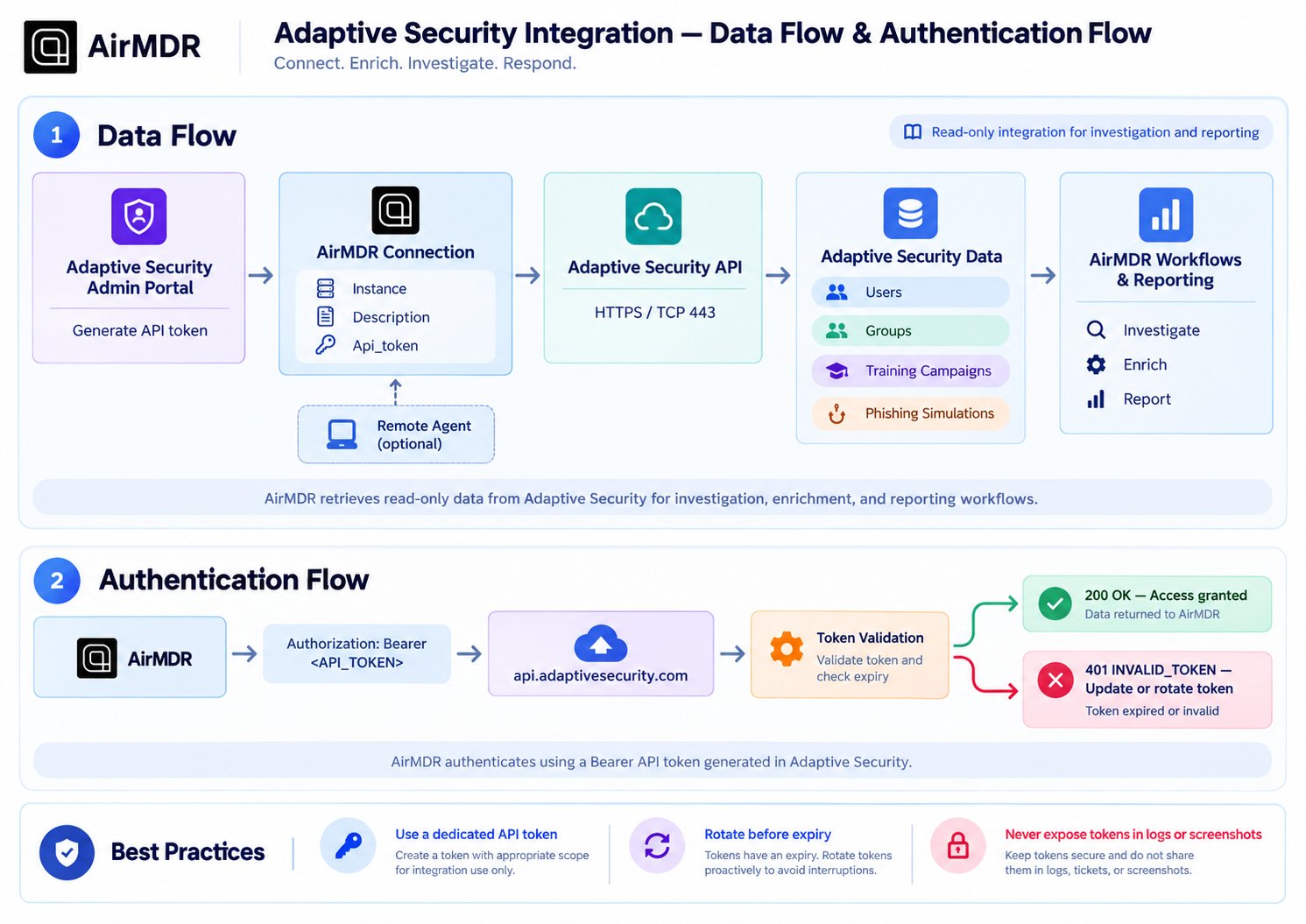
**Network Requirements**
| Direction | Source | Destination | Protocol | Port | Purpose |
| :- | :- | :- | :- | :- | :- |
| Outbound | AirMDR / Remote Agent | `api.adaptivesecurity.com` | HTTPS | 443 | Adaptive Security API communication |
**Data exchanged**
Depending on the AirMDR skill being executed, API responses can include information associated with:
* Adaptive Security users
* groups
* training campaigns and training progress
* phishing simulations
* related reporting information
Adaptive Security describes its Public API as supporting reporting and integration workflows across these resource areas.
**API access behavior**
The current AirMDR integration screen describes the Adaptive Security API as **read-only**, meaning that the configured token is used for retrieving data rather than launching campaigns, enrolling users, or modifying training through this integration.
This documentation is built and hosted on [Mintlify](https://mintlify.com), a developer documentation platform.