> ## Documentation Index
> Fetch the complete documentation index at: https://docs.airmdr.com/llms.txt
> Use this file to discover all available pages before exploring further.
# Beyond Trust
> AirMDR integrates with BeyondTrust to collect privileged access, remote support, and security activity data for investigation, enrichment, and automated response workflows.
## Purpose
The BeyondTrust integration enables AirMDR to connect with BeyondTrust APIs and retrieve relevant access, session, audit, and security event information. This helps SOC teams investigate privileged access activity, correlate incidents, and automate response actions from AirMDR playbooks.
## Supported Versions
| Component | Supported Version |
| :----------------------------------------- | :------------------ |
| BeyondTrust Remote Support | Supported |
| BeyondTrust Privileged Remote Access (PRA) | Supported |
| BeyondTrust BeyondInsight | Supported |
| BeyondTrust Password Safe | Supported |
| Deployment Models | Cloud & On-Premises |
| Authentication Method | OAuth 2.0 |
| AirMDR Integration Type | API-Based |
Menu names may vary slightly depending on your BeyondTrust deployment version.
## Authentication
AirMDR uses OAuth 2.0 authentication to securely connect to BeyondTrust APIs.
| Credential | Description | |
| :------------------ | :----------------------------------------------------- | -------------------------------------- |
| Base URL | BeyondTrust tenant URL or appliance URL | `https://company.beyondtrustcloud.com` |
| OAuth Client ID | Unique client identifier generated for the API account | `e52a9aa6*****3a40601a736b230a1bebcd1` |
| OAuth Client Secret | API Client Secret generated for the API account | `***************` |
### Role-Based Access Considerations
* Create a dedicated API account specifically for AirMDR.
* Follow the Principle of Least Privilege.
* Avoid using personal administrator accounts.
* Periodically rotate OAuth credentials.
* Store secrets securely.
### BeyondTrust Integration Setup Steps
1. Open a supported browser.
2. Go to the BeyondTrust admin URL: `https:///login`
3. Sign in with an administrator account.
Admin privileges are required to create or edit API accounts.
1. In the browser address bar, copy the BeyondTrust domain.
2. Remove `/login` from the URL.
3. Use the remaining value as the Base URL.\
Example:\
Login URL: `https://company.beyondtrustcloud.com/login` \
Base URL: `https://company.beyondtrustcloud.com`
**Use this Base URL while configuring the BeyondTrust integration in AirMDR.**
1. From the left navigation menu, select **Management**.
2. Open the **API Configuration** tab.
3. Confirm that API access is enabled.
For Remote Support or Privileged Remote Access deployments, ensure the required API options are enabled based on the AirMDR use case.
If API access is disabled, AirMDR cannot authenticate or retrieve data from BeyondTrust.
1. In **API Configuration**, click **Add** or **Create New API Account**.
2. Enter a clear account name. For Example: `AirMDR Integration API Account`.
3. Enable the API account.
4. Select the required API permissions.
5. Avoid selecting full access unless it is explicitly required and approved.
6. Click **Save**.
1. Open the newly created API account.
2. Locate the **OAuth Client ID** field.
3. Copy the value.
4. Store it securely for AirMDR configuration. \
**Example:**\
`OAuth Client ID:`\
``
1. In the same API account screen, click **Generate New Client Secret**.
2. Copy the generated secret immediately.
3. Store the secret in an approved password vault or secret manager.
4. Click **Save**.
**The OAuth Client Secret may be visible only once. If it is lost, generate a new client secret and update the AirMDR integration.**
### Integration Credential Requirements
Use the following values in the AirMDR integration configuration screen:
| AirMDR Field | BeyondTrust Value | Description |
| :---------------------- | :----------------------- | :---------------------------------------------------------------------------------------------------- |
| **Base URL** | BeyondTrust Instance URL | The root URL of your BeyondTrust tenant or appliance. Example: `https://company.beyondtrustcloud.com` |
| **OAuth Client ID** | OAuth Client ID | The unique identifier generated for the BeyondTrust API account. |
| **OAuth Client Secret** | OAuth Client Secret | The secret generated for the BeyondTrust API account and used for OAuth authentication. |
### Where to Obtain These Credentials
| Credential | Location in BeyondTrust |
| :---------------------- | :-------------------------------------------------------------------------------- |
| **Base URL** | Browser address bar after logging in to BeyondTrust (remove `/login` if present). |
| **OAuth Client ID** | **Management → API Configuration → API Account → OAuth Client ID** |
| **OAuth Client Secret** | **Management → API Configuration → API Account → Generate New Client Secret** |
The OAuth Client Secret may only be displayed once when generated. Store it securely in a password vault or secret management solution before proceeding with the AirMDR configuration.
### Validate Connectivity
Use the following command to verify connectivity and token authentication:
```text theme={null}
curl -X POST "https://company.beyondtrustcloud.com/oauth2/token" \
-H "Authorization: Basic " \
-H "Content-Type: application/x-www-form-urlencoded" \
-d "grant_type=client_credentials"
```
"access\_token": "eyJhbGciOiJIUzI1NiIs...",
"token\_type": "Bearer",
"expires\_in": 3600
### Configure BeyondTrust in AirMDR Integrations Dashboard
1. Navigate to [AirMDR](https://app.airmdr.com/auth/login), provide the credentials and click **Login**
2. Navigate to the AirMDR Integrations Dashboard in the left navigation pane and select **Integrations**.
3. Use the search option, enter the keyword "**Beyond Trust**", select the **Connections** tab, and click **+ Create** button.
4. Enter an unique name to the Instance (e.g., `your org name-BeyondTrust`) to easily identify the user connection by AirMDR.
5. Enter the application credentials like **Instance URL** and **Token** in the Authentication Details field params, and click **Save**.
### Skills provided by this Integration
| **Skill ID** | **Purpose** |
| :--------------------------------------- | :--------------------------------------------------------------------------------------------------------- |
| List BeyondTrust Jump Items | List Beyond Trust jump item events, optionally filtered by time window, jump group, jump item, or actor. |
| Get BeyondTrust Endpoint License Usage | Fetch the endpoint license usage report (ZIP metadata) from Beyond Trust. |
| List BeyondTrust Syslog | List the BeyondTrust syslog ZIP (last 30 days of /login admin changes). |
| Get BeyondTrust Access Session Recording | Fetch the recording metadata for a BeyondTrust access session identified by Isid. |
| Get BeyondTrust Access Session Summary | Summary report of BeyondTrust access sessions over a time window using the AccessSessionSummary report. |
| List Beyond Trust Vault Account Activity | List BeyondTrust vault account activity over a time window using the VaultAccountActivity report. |
| List BeyondTrust Access Sessions | List BeyondTrust access sessions within a time window using the AccessSessionListing report. |
| Get BeyondTrust Command Shell Recording | Fetch a command shell recording for a specific command shell instance within a BeyondTrust access session. |
| Get BeyondTrust Access Session | Fetch Beyond Trust access session(s) by Isid, or all sessions within a time window. |
| List BeyondTrust Teams | List BeyondTrust team activity, optionally filtered by time window or a specific team id. |
To view the details of Input Parameters and Output for the respective skills
* Go to [AirMDR → BeyondTrust](https://app.airmdr.com/integrationsv2/1c858710-d377-4044-a8e6-43ed4f78bdc1/skills?search=beyond) Integration page.
* Select the **Skills** tab and click on the required listed skills.
## Additional Information
#### Architecture Overview Diagram
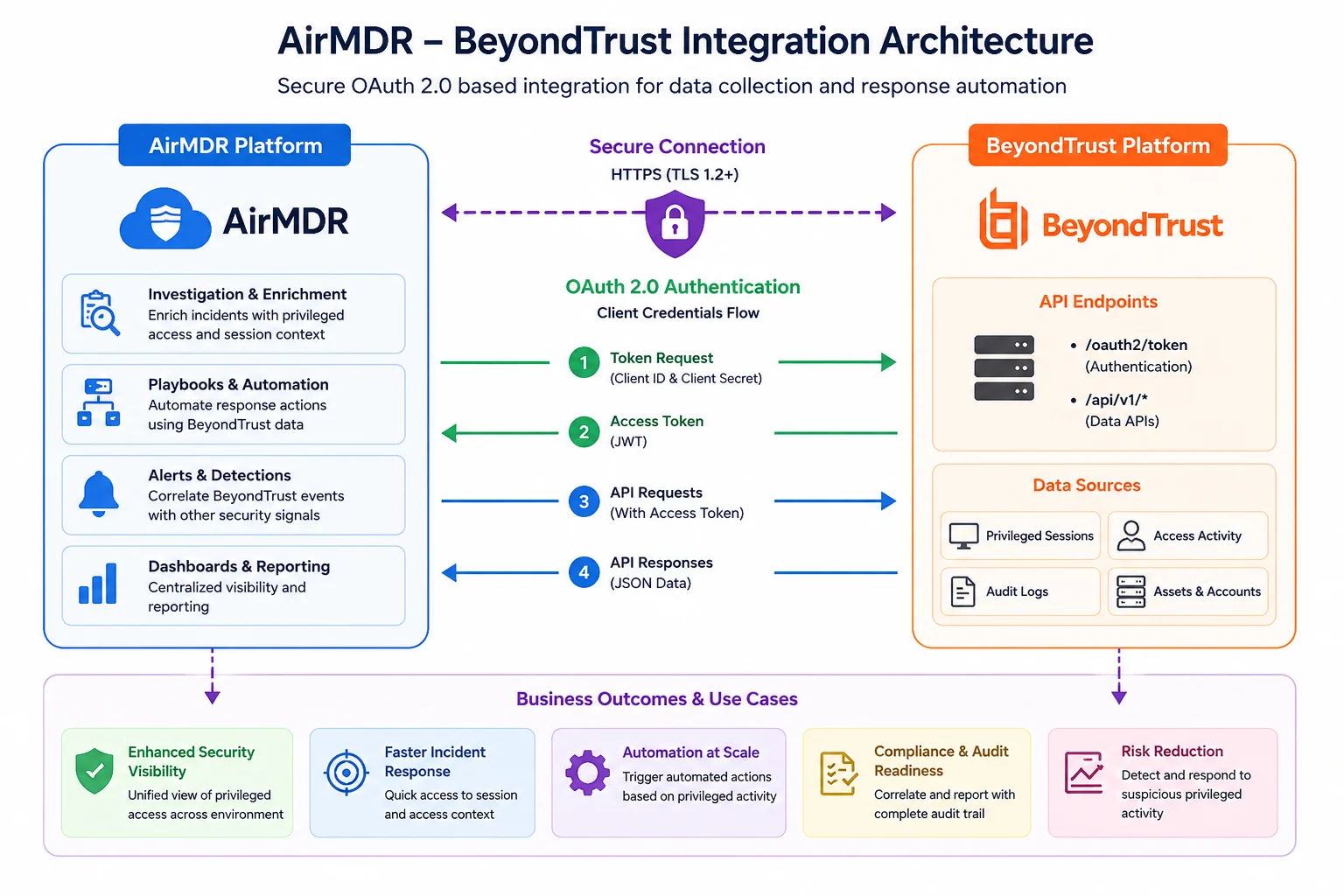 | Issue | Possible Cause | Resolution |
| :--------------------- | :---------------------------- | :------------------------------- |
| Invalid Base URL | Incorrect URL format | Remove `/login` and use root URL |
| Invalid Client ID | Incorrect value copied | Verify API account configuration |
| Invalid Client Secret | Secret regenerated or expired | Generate a new secret |
| Authentication Failure | OAuth misconfiguration | Validate credentials |
| Permission Denied | Missing API permissions | Review API account roles |
| Connection Timeout | Firewall or network issue | Verify HTTPS access |
## AirMDR Logs
Review: `Integrations → BeyondTrust → Logs`
## BeyondTrust Logs
Review: Management → `Audit Logs` or `Reports → API Activity`
or
### Sample Successful Log
```text theme={null}
INFO: BeyondTrust authentication successful.
```
### Sample Authentication Failure
```text theme={null}
ERROR: OAuth authentication failed.
```
### Sample Permission Failure
```text theme={null}
WARN: API account lacks required permissions.
```
### Recommended Log Levels
| Level | Purpose |
| :---- | :--------------------------------------- |
| INFO | Normal operations |
| WARN | Permission or configuration issues |
| ERROR | Authentication and connectivity failures |
* Use a dedicated API account for AirMDR.
* Apply least-privilege permissions.
* Rotate OAuth credentials regularly.
* Store credentials in an approved secret manager.
* Restrict access to integration administrators.
* Monitor API usage and audit logs.
* Immediately revoke compromised credentials.
* Review permissions quarterly.
> **Security Recommendation:** Never share OAuth Client Secrets through email, chat applications, or unsecured documentation. Use an approved enterprise secret management solution.
* 📧 Contact [**AirMDR Support**](mailto:support@airmdr.com) through your designated support channel for:
* API account issues
* Tenant configuration problems
* Authentication errors
* 🔁 Rotate credentials regularly.
* Rotate OAuth Client Secrets.
* Review API account permissions.
* Disable unused API accounts.
* Revalidate connectivity after BeyondTrust upgrades.
* Monitor integration logs for failures.
* 🔄 Reconnect in AirMDR when secrets are changed.
## Data Exchanged
Depending on permissions granted, AirMDR may retrieve:
* Privileged session information
* User access activity
* Audit logs
* Endpoint metadata
* Security investigation context
#### Encryption
| Category | Method |
| :----------------- | :----------------------- |
| Data in Transit | TLS 1.2+ / HTTPS |
| Authentication | OAuth 2.0 |
| Credential Storage | Secure encrypted storage |
#### Ports and Endpoints
| Item | Value |
| :------------- | :------------------------- |
| Protocol | HTTPS |
| Port | 443 |
| OAuth Endpoint | `/oauth2/token` |
| API Endpoint | Product-specific REST APIs |
| Issue | Possible Cause | Resolution |
| :--------------------- | :---------------------------- | :------------------------------- |
| Invalid Base URL | Incorrect URL format | Remove `/login` and use root URL |
| Invalid Client ID | Incorrect value copied | Verify API account configuration |
| Invalid Client Secret | Secret regenerated or expired | Generate a new secret |
| Authentication Failure | OAuth misconfiguration | Validate credentials |
| Permission Denied | Missing API permissions | Review API account roles |
| Connection Timeout | Firewall or network issue | Verify HTTPS access |
## AirMDR Logs
Review: `Integrations → BeyondTrust → Logs`
## BeyondTrust Logs
Review: Management → `Audit Logs` or `Reports → API Activity`
or
### Sample Successful Log
```text theme={null}
INFO: BeyondTrust authentication successful.
```
### Sample Authentication Failure
```text theme={null}
ERROR: OAuth authentication failed.
```
### Sample Permission Failure
```text theme={null}
WARN: API account lacks required permissions.
```
### Recommended Log Levels
| Level | Purpose |
| :---- | :--------------------------------------- |
| INFO | Normal operations |
| WARN | Permission or configuration issues |
| ERROR | Authentication and connectivity failures |
* Use a dedicated API account for AirMDR.
* Apply least-privilege permissions.
* Rotate OAuth credentials regularly.
* Store credentials in an approved secret manager.
* Restrict access to integration administrators.
* Monitor API usage and audit logs.
* Immediately revoke compromised credentials.
* Review permissions quarterly.
> **Security Recommendation:** Never share OAuth Client Secrets through email, chat applications, or unsecured documentation. Use an approved enterprise secret management solution.
* 📧 Contact [**AirMDR Support**](mailto:support@airmdr.com) through your designated support channel for:
* API account issues
* Tenant configuration problems
* Authentication errors
* 🔁 Rotate credentials regularly.
* Rotate OAuth Client Secrets.
* Review API account permissions.
* Disable unused API accounts.
* Revalidate connectivity after BeyondTrust upgrades.
* Monitor integration logs for failures.
* 🔄 Reconnect in AirMDR when secrets are changed.
## Data Exchanged
Depending on permissions granted, AirMDR may retrieve:
* Privileged session information
* User access activity
* Audit logs
* Endpoint metadata
* Security investigation context
#### Encryption
| Category | Method |
| :----------------- | :----------------------- |
| Data in Transit | TLS 1.2+ / HTTPS |
| Authentication | OAuth 2.0 |
| Credential Storage | Secure encrypted storage |
#### Ports and Endpoints
| Item | Value |
| :------------- | :------------------------- |
| Protocol | HTTPS |
| Port | 443 |
| OAuth Endpoint | `/oauth2/token` |
| API Endpoint | Product-specific REST APIs |