> ## Documentation Index
> Fetch the complete documentation index at: https://docs.airmdr.com/llms.txt
> Use this file to discover all available pages before exploring further.
# GitHub App
> The GitHub App integration enables AirMDR to securely connect with GitHub using app-based authentication, allowing it to access repository and organization data. This helps enrich alerts with code and activity context, and automate investigation and response workflows within AirMDR playbooks.
### **Purpose**
The **GitHub App integration** enables AirMDR to authenticate securely with GitHub using an app-based trust model. This allows AirMDR to access approved repository and organization data, enrich alerts with GitHub context, and automate workflows using GitHub events and metadata within AirMDR playbooks. GitHub recommends \*\*GitHub Apps \*\*for long-lived integrations instead of personal access tokens.
## Pre-requisites
Before configuring the GitHub App integration, ensure the following:
* A valid **GitHub account** or **GitHub organization**
* Permission to create a **GitHub App**
* Permission to **install the app** on the required account, organization, or repositories
* Administrative access to **AirMDR Integrations**
* A secure location to store the downloaded **PEM private key**
### **Supported Versions**
| Component | Supported Version |
| :------------------------------ | :---------------------------------- |
| [GitHub.com](http://GitHub.com) | Supported |
| GitHub Enterprise Cloud | Supported |
| AirMDR Platform | Current supported cloud deployments |
This setup flow is based on GitHub’s current GitHub App registration and installation model.
### **Authentication Method**
AirMDR uses **GitHub App authentication**.
### Required Credentials
| Credential | Description |
| :------------------ | :------------------------------------------------------- |
| **App ID** | Unique numeric identifier of the GitHub App |
| **Installation ID** | Unique identifier of the installed GitHub App instance |
| **PEM Private Key** | Private key downloaded from the GitHub App settings page |
### How GitHub App Authentication Works
GitHub App authentication works in the following sequence:
1. AirMDR uses the **App ID** and **PEM private key** to generate a **JWT**
2. GitHub uses that JWT to issue an **installation access token**
3. AirMDR uses the installation access token to call GitHub APIs for the installed app scope
### Role-Based Access Considerations
To create or install a GitHub App, the user must have sufficient administrative access to the target account, organization, or repository. GitHub notes that installing a GitHub App generally requires organization ownership, repository admin rights, or equivalent authority depending on the target scope.
This step requires admin privileges.
### Setup Steps
1. Sign in to GitHub.
2. In the upper-right corner, click your **profile picture**.
3. Navigate to the correct settings page:
* For a **personal account app**: click **Settings**
* For an **organization-owned app**: click **Your organizations** → select the organization → **Settings**
4. In the left sidebar, click Developer settings → GitHub Apps
5. Click on **New GitHub App**.
GitHub documents this as the standard path for registering a GitHub App.
### Configure the App
Enter the required app information, such as:
* **GitHub App name**
* **Homepage URL**
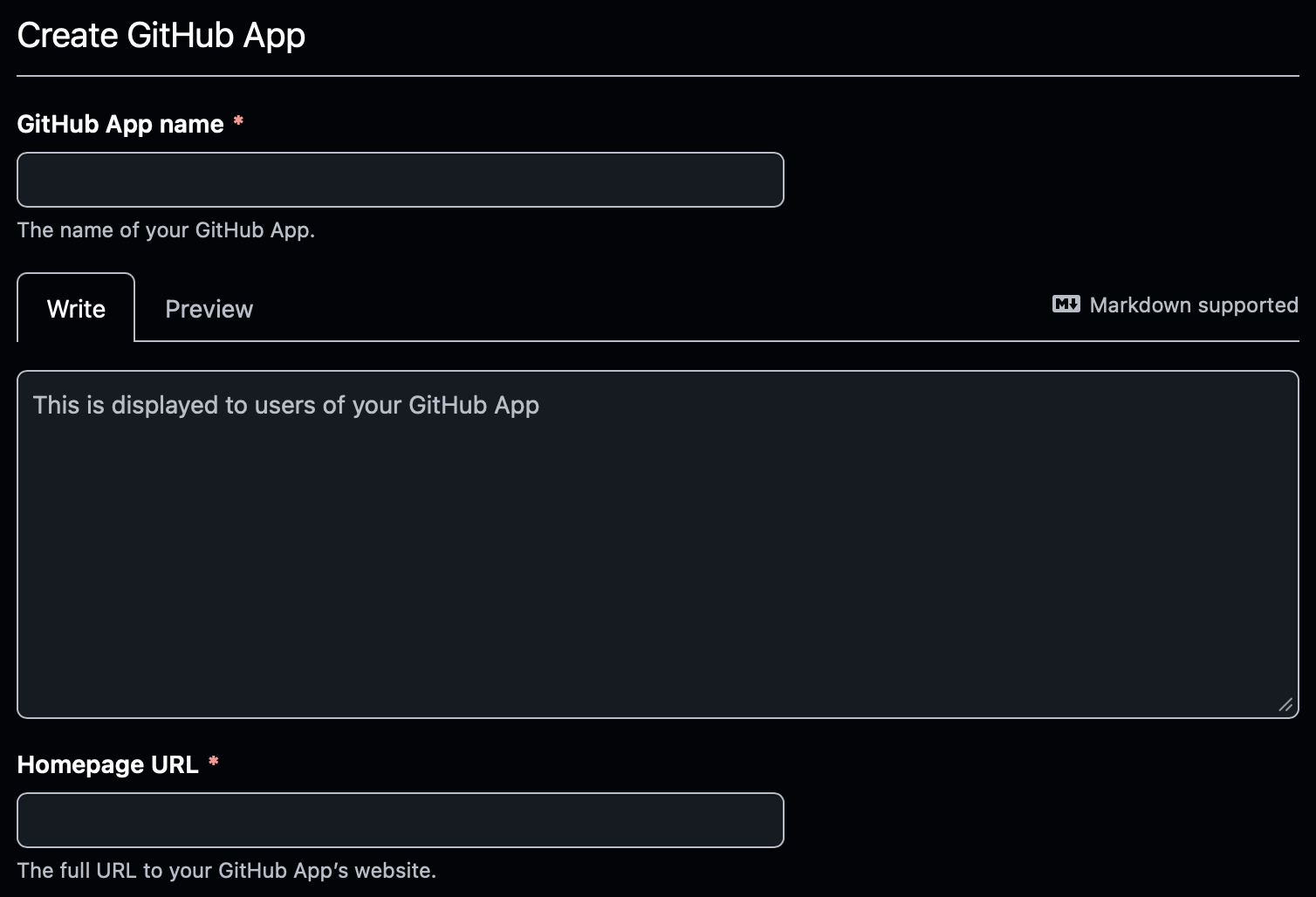 * **Webhook URL** (if your use case requires webhooks)
 * **Permissions**
* **Repository access**
* **Organization permissions** (if applicable)
* **Permissions**
* **Repository access**
* **Organization permissions** (if applicable)
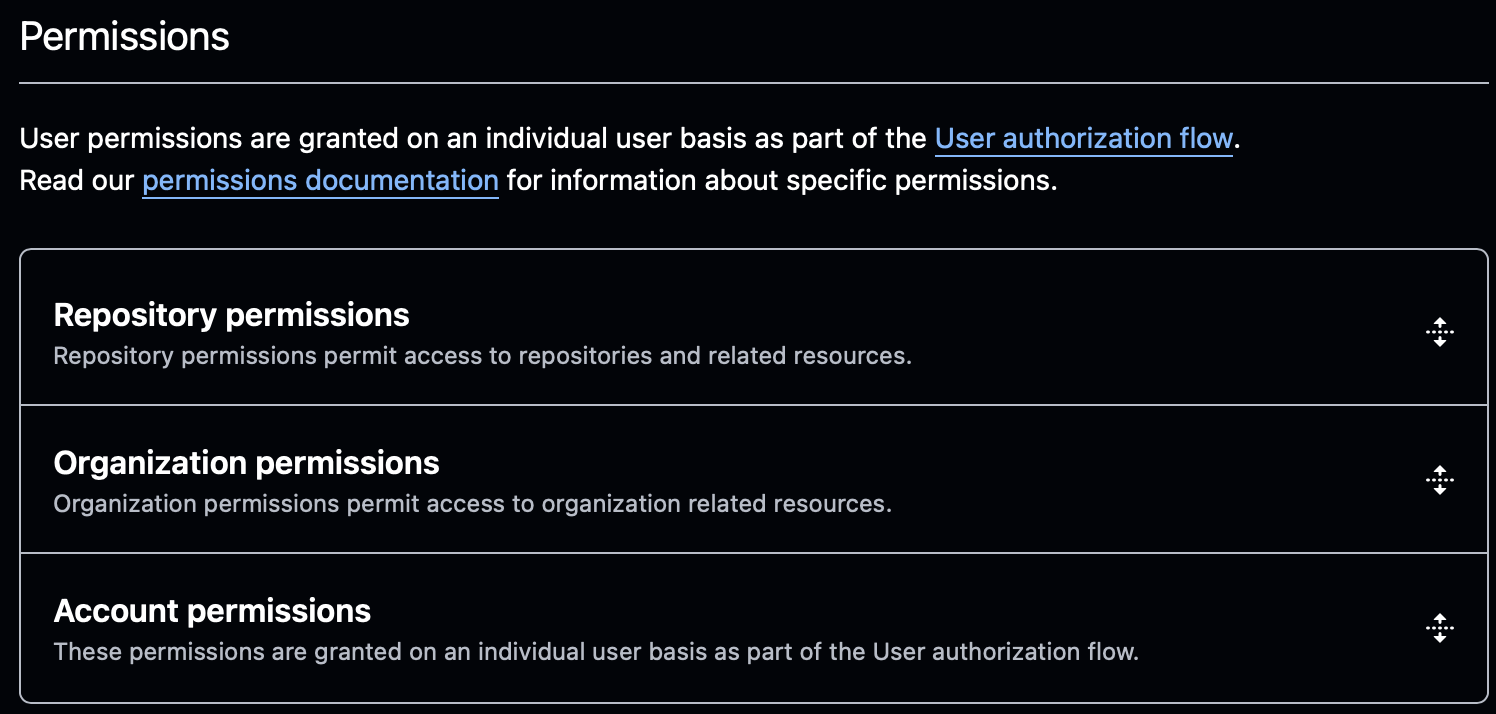 Grant only the permissions required for the AirMDR use case.
After the app is created:
1. Remain on the GitHub App settings page.
2. Locate the **App ID** shown in the app details.
GitHub states that the **App ID** is available on the GitHub App settings page and is required for app authentication.
### Example
```text theme={null}
App ID: 123456
```
Use this value in AirMDR as the **App ID**.
1. On the GitHub App settings page, scroll to the **Private keys** section.
2. Click on **"Generate a private key"**.
3. A **PEM file** is downloaded to your local machine.
GitHub documents private key generation and management for GitHub Apps and notes that private keys are used to authenticate the app and obtain installation tokens.
Store the PEM file securely. You will need to upload or paste its contents into AirMDR.
GitHub allows multiple private keys, which supports safe key rotation.
After creating the GitHub App, it must be installed on the target account or organization.
1. In the GitHub App settings page, click **Install App**.
2. Select the target:
* Personal account
* Organization
3. Choose one of the following:
* **All repositories**
* **Only selected repositories**
4. Complete the installation.
GitHub documents app installation as a required step before authenticating as an app installation.
After installation, GitHub creates an **Installation ID** for that installed app instance.
### UI Method
1. Open the GitHub App installation page.
2. Look at the browser URL.
Example:
```text theme={null}
https://github.com/settings/installations/12345678
```
In this example:
```text theme={null}
Installation ID = 12345678
```
GitHub also documents that installation authentication requires the **installation ID**, and that installation IDs can be obtained through installation context or API responses.
The installation ID is often easiest to identify directly from the installation page URL.
Done! now you have the required credentials
| Field | Value |
| :------------------ | :--------------------------------------- |
| **App ID** | GitHub App ID |
| **Installation ID** | GitHub App Installation ID |
| **PEM Key** | Full contents of the downloaded PEM file |
Share the \*\*App ID, Installation ID \*\*and **PEM Key** securely to AirMDR.\
(or)\
Self [**Configure**](https://app.airmdr.com/integrationsv2/dce6d003-ccc3-4f0a-9c7c-f78d7313dc7b/skills?search=GitHub) GitHub App in the AirMDR Integrations Dashboard.
### UI Path Reference
| Credential | How to Get It (UI Path) |
| :------------------ | :----------------------------------------------------------------------------------------- |
| **App ID** | Profile → Settings / Organization Settings → Developer settings → GitHub Apps → Select App |
| **PEM Key** | GitHub App settings page → Private keys → Generate a private key |
| **Installation ID** | GitHub App settings page → Install App → Open installation page → copy ID from URL |
### Skills Provided by this Integration
| **Skill ID** | **Purpose** |
| ------------------------------- | ---------------------------------------------------------------------------------------------------------------------------------------------------------------------------------------------------------------------------------------------------------------------------------------------------------------------------- |
| GitHub App Analyze and Raise PR | Authenticates via a GitHub App (PEM key, App ID, Installation ID), fetches source files from the specified repository, and sends them to Claude with a custom prompt to perform any task — refactoring, bug fixing, documentation, security review, adding tests, and more — then opens a pull request with Claudes changes. |
To view the details of Input Parameters and Output for the respective skills
* Go to [AirMDR → GitHub App](https://app.airmdr.com/integrationsv2/dce6d003-ccc3-4f0a-9c7c-f78d7313dc7b/skills?search=GitHub) Integration page.
* Select the **Skills** tab and click on the required listed skills.
### **Data Flow & Security**
### Data Exchanged
Depending on the permissions granted to the GitHub App, AirMDR may access:
* Repository metadata
* Organization metadata
* Security findings
* Pull request context
* Workflow and commit information
* Other GitHub resources within the approved installation scope
### Security Controls
| Layer | Method |
| :--------- | :------------------------------------- |
| In transit | HTTPS / TLS |
| At rest | Encrypted credential storage in AirMDR |
### GitHub Endpoints
Typical GitHub endpoints include:
```text theme={null}
https://github.com
https://api.github.com
```
### Authentication Security Model
* AirMDR does **not** authenticate with a personal access token
* Authentication is scoped to the **installed GitHub App**
* Effective permissions depend on:
* App permissions
* Installation scope
* Repository selection
### **Monitoring & Logs**
Integration activity can be monitored from the AirMDR integration logs.
### Sample Log Entry
```text theme={null}
{
"integration": "github_app",
"operation": "generate_installation_token",
"status": "success",
"app_id": "123456",
"installation_id": "12345678",
"timestamp": "2026-03-18T10:20:00Z"
}
```
### Recommended Log Levels
| Scenario | Log Level |
| :---------------- | :-------- |
| Normal operations | INFO |
| Troubleshooting | DEBUG |
### **Error Handling**
| Error | Cause | Resolution |
| :---------------------- | :--------------------------------------------------- | :----------------------------------------------------------- |
| Invalid App ID | Incorrect App ID entered | Verify the App ID from the GitHub App settings page |
| Invalid Installation ID | Incorrect installation selected or app not installed | Reopen the installation page and confirm the Installation ID |
| PEM key error | Wrong file contents or formatting issue | Re-upload the PEM content including header/footer |
| Permission denied | App lacks required scopes | Update GitHub App permissions and reinstall if necessary |
| Authentication failed | App not installed properly | Confirm the app installation target and repository scope |
### **Support & Maintenance**
* 📧 Contact [**AirMDR Support**](mailto:support@airmdr.com) through your designated support channel.
* 🔁 Rotate credentials regularly in **GitHub App**.
* 🔄 Reconnect in AirMDR when secrets are changed.
### Configure GitHub App in AirMDR Integrations Dashboard
1. Navigate to [AirMDR](https://app.airmdr.com/auth/login), provide the credentials and click **Login**.
2. Navigate to the AirMDR Integrations Dashboard in the left navigation pane and select **Integrations**.
3. Use the search option, enter the keyword "**GitHub**", select the **Connections** tab, and click **Add New Connection**.
4. Enter an unique name to the **Instance** (e.g., `your org name-GitHub App`) and brief **Description** to easily identify the user connection by AirMDR.
5. Enter the generated **App\_id, Install\_ID,** **Pem Key** and Expiry (optional) in the Authentication Details field params, and click **Save.**
Grant only the permissions required for the AirMDR use case.
After the app is created:
1. Remain on the GitHub App settings page.
2. Locate the **App ID** shown in the app details.
GitHub states that the **App ID** is available on the GitHub App settings page and is required for app authentication.
### Example
```text theme={null}
App ID: 123456
```
Use this value in AirMDR as the **App ID**.
1. On the GitHub App settings page, scroll to the **Private keys** section.
2. Click on **"Generate a private key"**.
3. A **PEM file** is downloaded to your local machine.
GitHub documents private key generation and management for GitHub Apps and notes that private keys are used to authenticate the app and obtain installation tokens.
Store the PEM file securely. You will need to upload or paste its contents into AirMDR.
GitHub allows multiple private keys, which supports safe key rotation.
After creating the GitHub App, it must be installed on the target account or organization.
1. In the GitHub App settings page, click **Install App**.
2. Select the target:
* Personal account
* Organization
3. Choose one of the following:
* **All repositories**
* **Only selected repositories**
4. Complete the installation.
GitHub documents app installation as a required step before authenticating as an app installation.
After installation, GitHub creates an **Installation ID** for that installed app instance.
### UI Method
1. Open the GitHub App installation page.
2. Look at the browser URL.
Example:
```text theme={null}
https://github.com/settings/installations/12345678
```
In this example:
```text theme={null}
Installation ID = 12345678
```
GitHub also documents that installation authentication requires the **installation ID**, and that installation IDs can be obtained through installation context or API responses.
The installation ID is often easiest to identify directly from the installation page URL.
Done! now you have the required credentials
| Field | Value |
| :------------------ | :--------------------------------------- |
| **App ID** | GitHub App ID |
| **Installation ID** | GitHub App Installation ID |
| **PEM Key** | Full contents of the downloaded PEM file |
Share the \*\*App ID, Installation ID \*\*and **PEM Key** securely to AirMDR.\
(or)\
Self [**Configure**](https://app.airmdr.com/integrationsv2/dce6d003-ccc3-4f0a-9c7c-f78d7313dc7b/skills?search=GitHub) GitHub App in the AirMDR Integrations Dashboard.
### UI Path Reference
| Credential | How to Get It (UI Path) |
| :------------------ | :----------------------------------------------------------------------------------------- |
| **App ID** | Profile → Settings / Organization Settings → Developer settings → GitHub Apps → Select App |
| **PEM Key** | GitHub App settings page → Private keys → Generate a private key |
| **Installation ID** | GitHub App settings page → Install App → Open installation page → copy ID from URL |
### Skills Provided by this Integration
| **Skill ID** | **Purpose** |
| ------------------------------- | ---------------------------------------------------------------------------------------------------------------------------------------------------------------------------------------------------------------------------------------------------------------------------------------------------------------------------- |
| GitHub App Analyze and Raise PR | Authenticates via a GitHub App (PEM key, App ID, Installation ID), fetches source files from the specified repository, and sends them to Claude with a custom prompt to perform any task — refactoring, bug fixing, documentation, security review, adding tests, and more — then opens a pull request with Claudes changes. |
To view the details of Input Parameters and Output for the respective skills
* Go to [AirMDR → GitHub App](https://app.airmdr.com/integrationsv2/dce6d003-ccc3-4f0a-9c7c-f78d7313dc7b/skills?search=GitHub) Integration page.
* Select the **Skills** tab and click on the required listed skills.
### **Data Flow & Security**
### Data Exchanged
Depending on the permissions granted to the GitHub App, AirMDR may access:
* Repository metadata
* Organization metadata
* Security findings
* Pull request context
* Workflow and commit information
* Other GitHub resources within the approved installation scope
### Security Controls
| Layer | Method |
| :--------- | :------------------------------------- |
| In transit | HTTPS / TLS |
| At rest | Encrypted credential storage in AirMDR |
### GitHub Endpoints
Typical GitHub endpoints include:
```text theme={null}
https://github.com
https://api.github.com
```
### Authentication Security Model
* AirMDR does **not** authenticate with a personal access token
* Authentication is scoped to the **installed GitHub App**
* Effective permissions depend on:
* App permissions
* Installation scope
* Repository selection
### **Monitoring & Logs**
Integration activity can be monitored from the AirMDR integration logs.
### Sample Log Entry
```text theme={null}
{
"integration": "github_app",
"operation": "generate_installation_token",
"status": "success",
"app_id": "123456",
"installation_id": "12345678",
"timestamp": "2026-03-18T10:20:00Z"
}
```
### Recommended Log Levels
| Scenario | Log Level |
| :---------------- | :-------- |
| Normal operations | INFO |
| Troubleshooting | DEBUG |
### **Error Handling**
| Error | Cause | Resolution |
| :---------------------- | :--------------------------------------------------- | :----------------------------------------------------------- |
| Invalid App ID | Incorrect App ID entered | Verify the App ID from the GitHub App settings page |
| Invalid Installation ID | Incorrect installation selected or app not installed | Reopen the installation page and confirm the Installation ID |
| PEM key error | Wrong file contents or formatting issue | Re-upload the PEM content including header/footer |
| Permission denied | App lacks required scopes | Update GitHub App permissions and reinstall if necessary |
| Authentication failed | App not installed properly | Confirm the app installation target and repository scope |
### **Support & Maintenance**
* 📧 Contact [**AirMDR Support**](mailto:support@airmdr.com) through your designated support channel.
* 🔁 Rotate credentials regularly in **GitHub App**.
* 🔄 Reconnect in AirMDR when secrets are changed.
### Configure GitHub App in AirMDR Integrations Dashboard
1. Navigate to [AirMDR](https://app.airmdr.com/auth/login), provide the credentials and click **Login**.
2. Navigate to the AirMDR Integrations Dashboard in the left navigation pane and select **Integrations**.
3. Use the search option, enter the keyword "**GitHub**", select the **Connections** tab, and click **Add New Connection**.
4. Enter an unique name to the **Instance** (e.g., `your org name-GitHub App`) and brief **Description** to easily identify the user connection by AirMDR.
5. Enter the generated **App\_id, Install\_ID,** **Pem Key** and Expiry (optional) in the Authentication Details field params, and click **Save.**