> ## Documentation Index
> Fetch the complete documentation index at: https://docs.airmdr.com/llms.txt
> Use this file to discover all available pages before exploring further.
# AirMDR Pause & Wait for Email Response
> AirMDR Pause and Wait for Email Response checkpoint allows a playbook to pause execution and wait for a response from a recipient via email.
This feature is useful when human confirmation is required before proceeding with automated investigation or remediation actions.
For example, a security team may need to verify whether a user performed a suspicious activity. The playbook can automatically send an email to the user and pause until a response is received or the configured timeout period expires.
## Purpose
The Email Response Checkpoint enables human-in-the-loop validation within automated playbooks.
**Common use cases include:**
* Confirming suspicious login activity
* Verifying phishing email interactions
* Validating account actions with end users
* Gathering user confirmation before remediation actions
* Reducing false positives through direct user verification
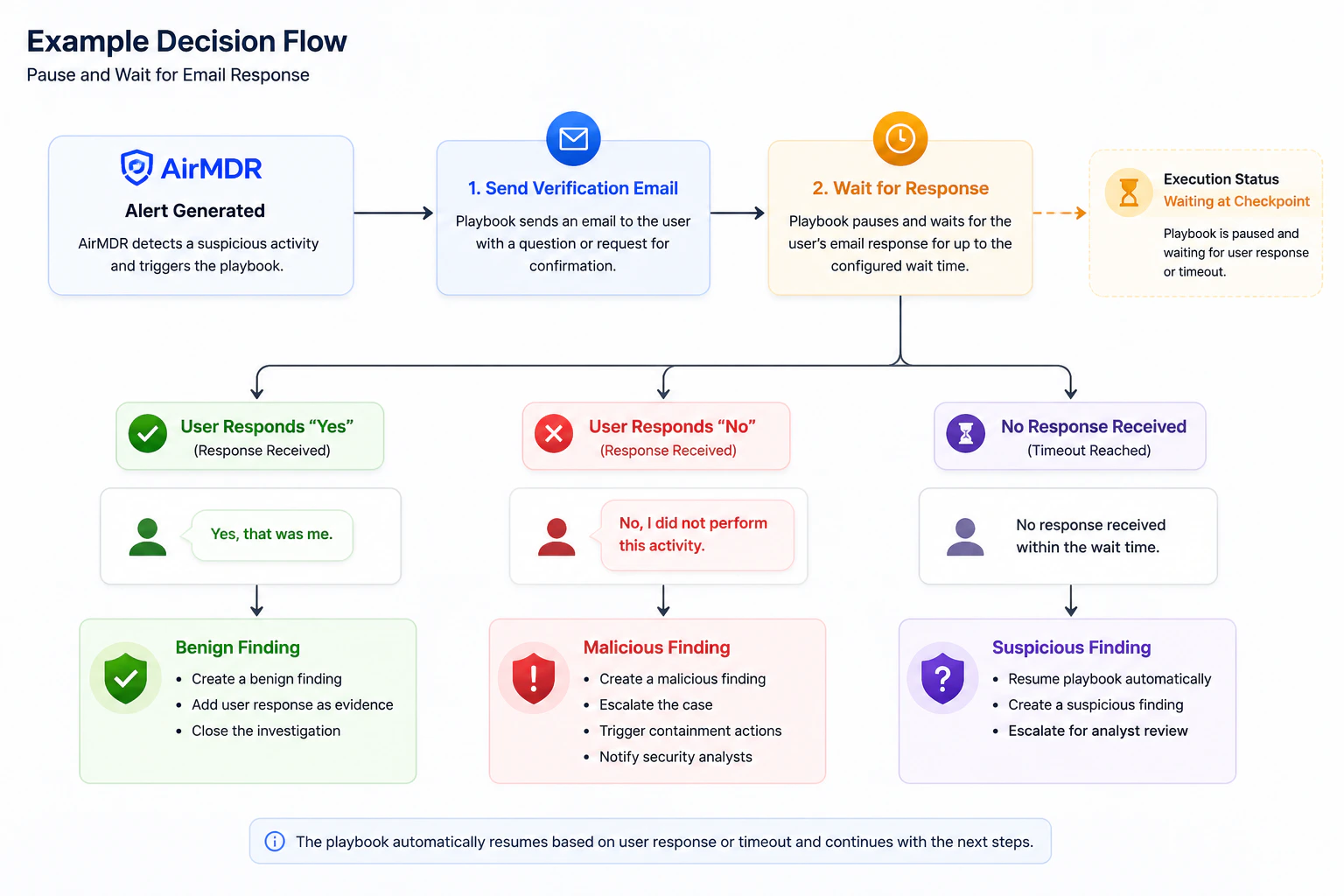
When a playbook reaches a **Wait for an Email Response** checkpoint:
1. AirMDR sends an email to the specified recipient.
2. The playbook execution status changes to **Waiting at Checkpoint**.
3. The playbook remains paused until:
* The recipient replies to the email, or
* The configured wait time expires.
4. Once a response is received or the timeout is reached, the playbook automatically resumes execution.
5. Subsequent playbook steps can use the recipient's response to determine the next action.
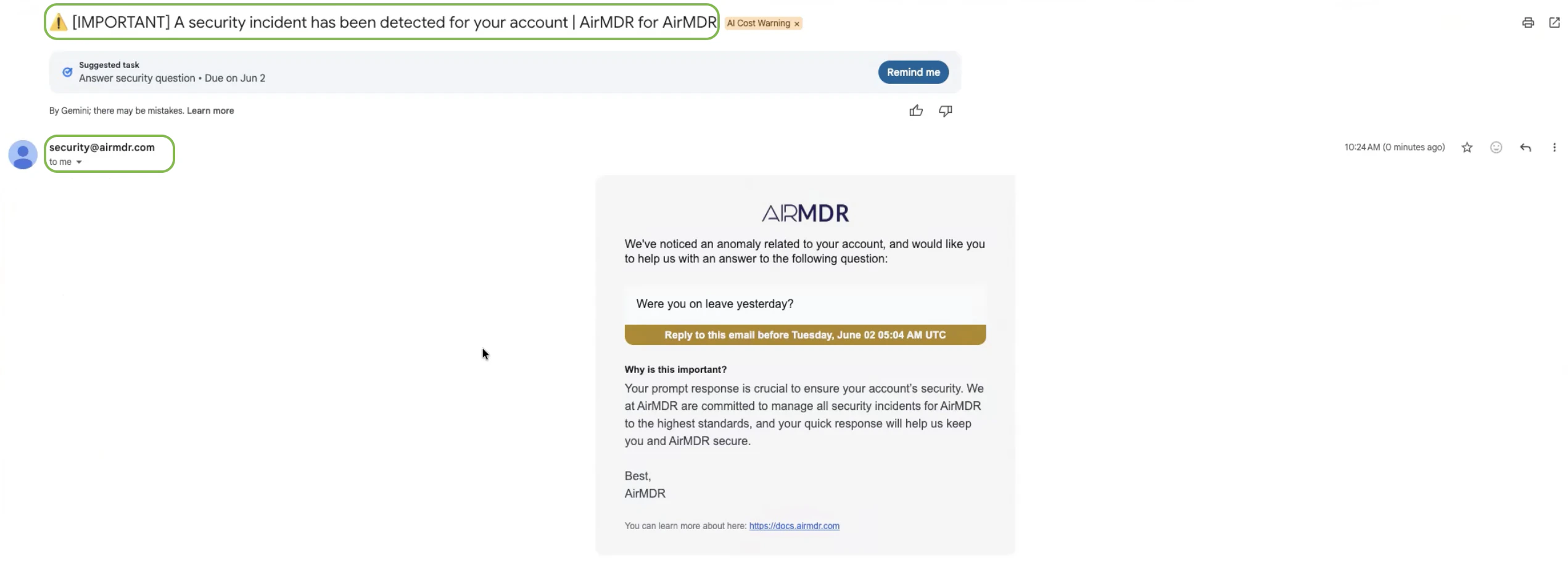
The recipient receives an [email](mailto:security@airmdr.com) requesting confirmation regarding a detected security event.
The email contains:
* A predefined security notification subject
* A security-related message configured by the playbook creator
* Instructions to reply directly to the email
* No requirement to log in to AirMDR
Because recipients may not have access to the AirMDR platform, all interaction occurs through email replies.
 ## 📖 Playbook Behavior
 ### Email Checkpoint Skill Behavior Scenarios
**Important**
👤 **Users must reply to the original email sent by AirMDR.** \
\
⚠️ **Creating a new email or sending a response outside the original email thread will not resume the playbook execution.**
If the recipient replies before the configured timeout:
* The checkpoint is completed.
* The playbook resumes execution.
* The response body is captured as checkpoint output.
* Subsequent steps can evaluate the response and take appropriate actions.
Example:
```text theme={null}
User Reply: (To the same email)
Yes, that was me.
```
The playbook may classify the activity as benign and close the investigation.
**Example:**
```text theme={null}
User Reply: (To the same email)
No, I was on leave last friday.
```
### Email Checkpoint Skill Behavior Scenarios
**Important**
👤 **Users must reply to the original email sent by AirMDR.** \
\
⚠️ **Creating a new email or sending a response outside the original email thread will not resume the playbook execution.**
If the recipient replies before the configured timeout:
* The checkpoint is completed.
* The playbook resumes execution.
* The response body is captured as checkpoint output.
* Subsequent steps can evaluate the response and take appropriate actions.
Example:
```text theme={null}
User Reply: (To the same email)
Yes, that was me.
```
The playbook may classify the activity as benign and close the investigation.
**Example:**
```text theme={null}
User Reply: (To the same email)
No, I was on leave last friday.
```
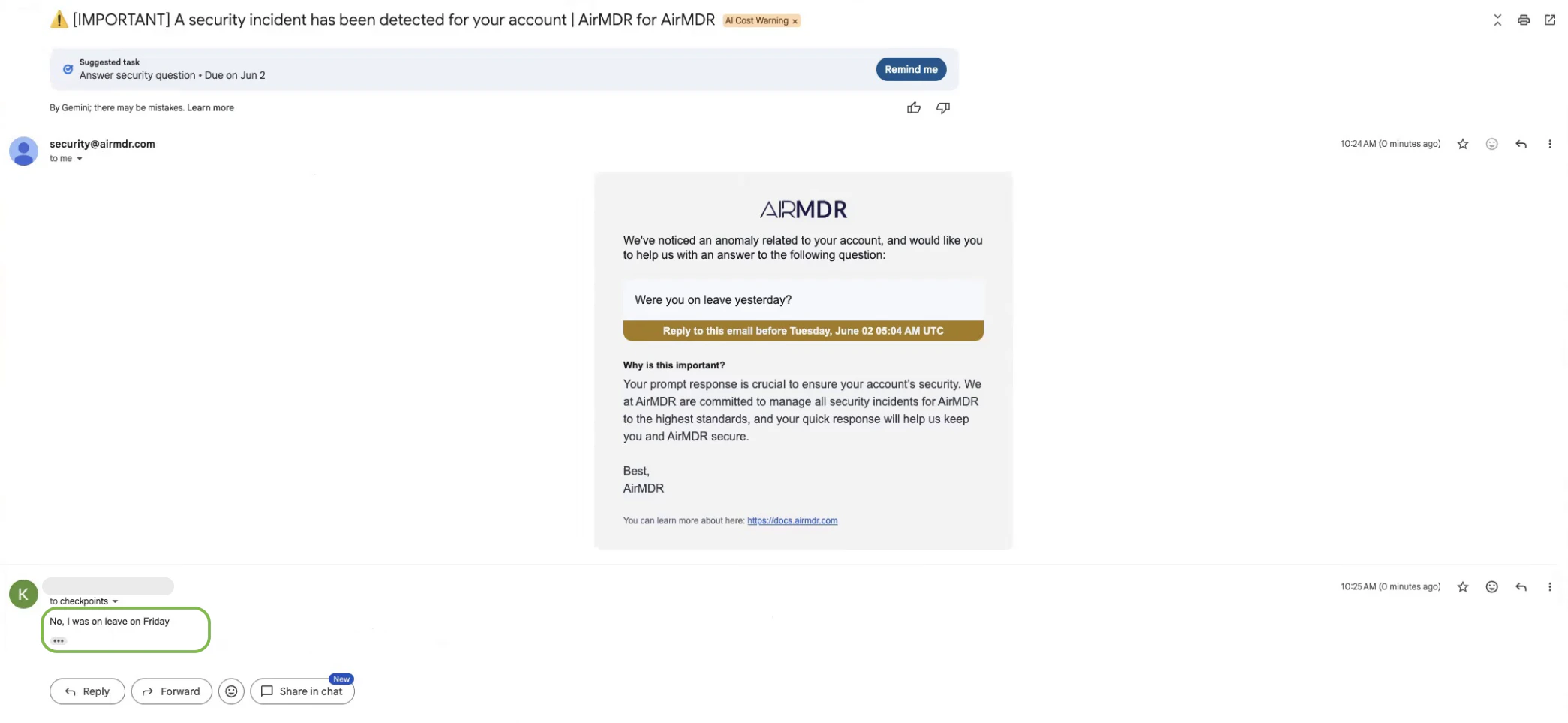 The playbook can:
* Create a malicious finding
* Escalate the case
* Trigger containment actions
* Notify analysts
If the recipient does not respond within the configured wait time:
* The checkpoint timeout is reached.
* The playbook automatically resumes.
* The execution records that no response was received.
* Subsequent playbook logic can mark the event as suspicious and escalate for analyst review.
## Additional Information
When building a playbook, configure the following parameters:
| Parameter | Description |
| :-------------- | :------------------------------------------------------- |
| Recipient Email | Email address of the user who will receive the message |
| Email Body | Message content sent to the recipient |
| Wait Time | Maximum duration the playbook should wait for a response |
**After execution resumes, the checkpoint provides the following outputs:**
| Output | Description |
| :------------------ | :------------------------------------------------------------------------ |
| Trigger Status | Indicates whether a user response was received or the timeout was reached |
| Response Email Body | The content of the user's email reply |
These outputs can be used in conditional branches to determine the next playbook action.
**Phishing Investigation**
1. A phishing alert is generated.
2. The playbook sends an email to the affected user.
3. The playbook pauses and waits for a response for up to 1 hour.
Possible outcomes:
| User Response | Recommended Action |
| :-------------------------- | :---------------------------------------------- |
| "I did not click the link." | Create a benign finding |
| "I clicked the link." | Create a malicious finding and escalate |
| No response received | Create a suspicious finding and notify analysts |
While waiting for a response, the playbook execution displays the following status:
```text theme={null}
Waiting at Checkpoint
```
This status indicates that execution is paused and awaiting either a user response or timeout expiration.
* Keep questions simple and direct.
* Ask questions that can be answered clearly.
* Provide sufficient context for the recipient.
* Configure reasonable timeout values based on business requirements.
* Use conditional branching to handle positive, negative, and no-response scenarios.
* Include user responses as evidence in findings whenever applicable.
* Recipients do not require an AirMDR account.
* Users interact solely through email replies.
* Playbook execution automatically resumes after a response or timeout.
* No manual intervention is required to restart execution.
* The feature supports MSSP branding and can be customized for partner deployments.
* 📧 Contact [**AirMDR Support**](mailto:support@airmdr.com) through your designated support channel.
* 🔄 Connect in AirMDR in case of any suspicious activity.
The playbook can:
* Create a malicious finding
* Escalate the case
* Trigger containment actions
* Notify analysts
If the recipient does not respond within the configured wait time:
* The checkpoint timeout is reached.
* The playbook automatically resumes.
* The execution records that no response was received.
* Subsequent playbook logic can mark the event as suspicious and escalate for analyst review.
## Additional Information
When building a playbook, configure the following parameters:
| Parameter | Description |
| :-------------- | :------------------------------------------------------- |
| Recipient Email | Email address of the user who will receive the message |
| Email Body | Message content sent to the recipient |
| Wait Time | Maximum duration the playbook should wait for a response |
**After execution resumes, the checkpoint provides the following outputs:**
| Output | Description |
| :------------------ | :------------------------------------------------------------------------ |
| Trigger Status | Indicates whether a user response was received or the timeout was reached |
| Response Email Body | The content of the user's email reply |
These outputs can be used in conditional branches to determine the next playbook action.
**Phishing Investigation**
1. A phishing alert is generated.
2. The playbook sends an email to the affected user.
3. The playbook pauses and waits for a response for up to 1 hour.
Possible outcomes:
| User Response | Recommended Action |
| :-------------------------- | :---------------------------------------------- |
| "I did not click the link." | Create a benign finding |
| "I clicked the link." | Create a malicious finding and escalate |
| No response received | Create a suspicious finding and notify analysts |
While waiting for a response, the playbook execution displays the following status:
```text theme={null}
Waiting at Checkpoint
```
This status indicates that execution is paused and awaiting either a user response or timeout expiration.
* Keep questions simple and direct.
* Ask questions that can be answered clearly.
* Provide sufficient context for the recipient.
* Configure reasonable timeout values based on business requirements.
* Use conditional branching to handle positive, negative, and no-response scenarios.
* Include user responses as evidence in findings whenever applicable.
* Recipients do not require an AirMDR account.
* Users interact solely through email replies.
* Playbook execution automatically resumes after a response or timeout.
* No manual intervention is required to restart execution.
* The feature supports MSSP branding and can be customized for partner deployments.
* 📧 Contact [**AirMDR Support**](mailto:support@airmdr.com) through your designated support channel.
* 🔄 Connect in AirMDR in case of any suspicious activity.