> ## Documentation Index
> Fetch the complete documentation index at: https://docs.airmdr.com/llms.txt
> Use this file to discover all available pages before exploring further.
# Send Alerts via Webhook (API call) to AirMDR
> To send alerts via a Webhook (API call) to AirMDR, you will need to perform a standard HTTP POST request from your system (e.g., Cyberhaven, SIEM, SOAR, or Lambda) to the MDR's provided Webhook URL.
## ✨ Step-by-Step for End Users
1. Go to [AirMDR Admin console](https://app.airmdr.com/).
2. Use your credentials to SignIn.
1. Create the API key.
Refer to 🔗 [**How to generate an AirMDR API Token**](https://docs.airmdr.com/api-reference/apitoken)
2. To create alert on AirMDR services use the following API request
Fill in:
* **API URL**: [Create alerts](https://app.airmdr.com/docs/api/case_manager.html#tag/Alerts/operation/createAlertsAPI)
* **Method**: `POST`
* 🔐**Authentication** (AirMDR API Key).
```
Header = {"Cookie": "Session="API_KEY", "Content-Type": "application/json"}
```
Choose **what types of alerts** you want sent automatically (e.g., all, critical only, specific policies).
1. Define the **payload format** (default is **JSON**).
Test the webhook feature to make sure it's working
📦 **Request Body Parameters for creating alerts:**
| Field | Type | Required | Description |
| :------------------ | :--------------- | :------- | :------------------------------------------------------------------------------ |
| `alert_content` | string | ✅ | The content/body of the alert |
| `alert_provider` | string | ✅ | The provider/source of the alert (e.g. cyberhaven, aws, microsoft\_graph, etc.) |
| `Organization_code` | string | ✅ | Code/identifier of the organization this alert belongs to |
| `alert_type` | string | ✅ | The type/category of the alert |
| `created_at_source` | integer \ | ❌ | Timestamp when the alert was created at the source/provider |
**AirMDR Json parameters**
```
{
"alert_content": "string",
"alert_provider": "string",
"alert_type": "string",
"organization_code": "string",
"created_at_source": integer
}
```
**Mandatory Required Params:**
* "organization\_code": "string",
To fetch your organization code on AirMDR services use the following API request
* **API URL**: [getOrganizationsAPI](https://app.airmdr.com/docs/api/user_management_service.html#tag/Organization/operation/getOrganizationListAPI)
* **Method**: `GET`
* 🔐**Authentication** (AirMDR API Key).
```
Header = {"Cookie": "Session="API_KEY", "Content-Type": "application/json"}
```
* "alert\_content": "string",
* "alert\_provider": "string"
To fetch list of providers on AirMDR services use the following API request
* **API URL**: [getProvidersAPI](https://dev-darryl.airmdr.com/docs/api/knowledge_service.html#tag/ConnectionsManager/operation/getProvidersAPI)
* **Method**: `GET`
* 🔐**Authentication** (AirMDR API Key).
```
Header = {"Cookie": "Session="API_KEY", "Content-Type": "application/json"}
```
* "alert\_type": "string"
In order for the AI to automatically investigate an alert, the user must provide the **alert\_type** parameter.
### 📋 Quick Example: Sending Alert to AirMDR via Webhook
> **Request sample**
```
curl --location 'https://app.airmdr.com/airmdrapi/alerts' \
--header 'Cookie: Session=""' \
--header 'Content-Type: application/json' \
--data '{
"alert_content": "Dummy content",
"alert_provider": "aws",
"organization_code": "ASO",
"alert_type": "Dummy Alert Type",
"created_at_source": 1717659339
}'
```
> **Response sample**
```
{
"alert_content":"Dummy content",
"alert_id":"ASO-AWS-129",
"alert_provider":"aws",
"alert_type":"Dummy Alert Type",
"alert_uuid":"7ffe9065-ef7e-44ee-b19f-142de5e10422",
"created_at":1746425005,
"created_at_source":1746425005,
"created_by":"11f9cc8f-8c0c-484d-a2e7-de2b5b9b05ea",
"investigation_retry_count":0,
"investigation_status":0,
"modified_at":1746425005,
"organization_code":"ASO",
"organization_uuid":"accb34f3-85c5-4137-906b-55b3022034a3"
}
```
Investigation Status Values:
**Created = 0,**\
**Submitted = 5,**\
**InProgress = 10,**\
**Completed = 15,**\
**Failed = 20**
### AirMDR Alerts Dashboard UI
You can view all your created alerts on the [Alerts](https://app.airmdr.com/alerts) page.
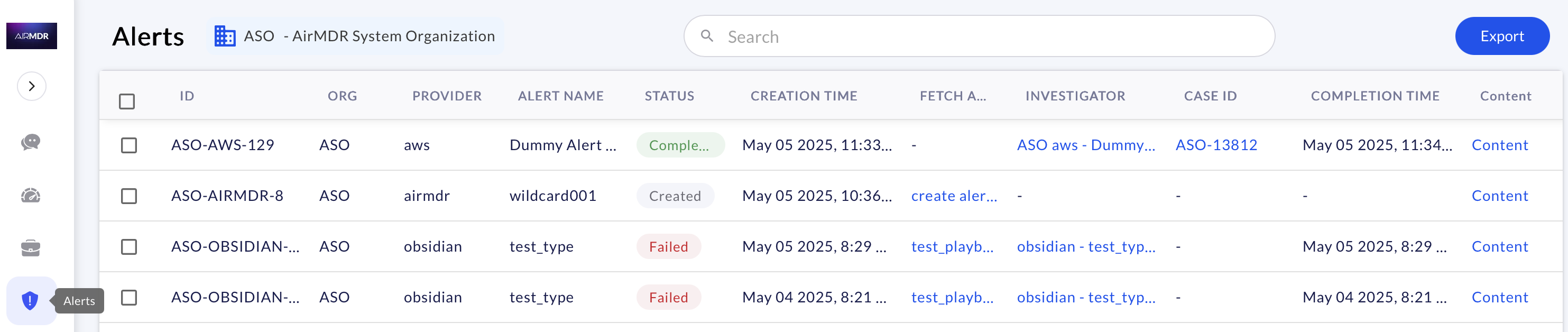 If the User provides the **alert\_type** parameter, AI automatically
* Creates a new [Investigator Playbook](https://app.airmdr.com/playbooks) (If there is no existing playbook for specified alert\_type)\
or
* Investigate the alert within the existing [Investigator Playbook](https://app.airmdr.com/playbooks)
and
* Creates a [Case](https://app.airmdr.com/casesv2) (Everytime a new Case is generated in the Case Management).
The alert content is organized and segregated in the [Alerts](https://app.airmdr.com/alerts) page, with each column indicating the corresponding data.
| Title | Description | Example |
| --------------- | -------------------------------------------------------------------------------------------------------------------- | --------------------------------------------------------------------------------------------------- |
| ID | The ID is compiled as **Org ID-Alert provider-Sequence Number** | ASO-AWS-129 |
| ORG | Organization Identifier: Unique code assigned to respective organization | ASO |
| PROVIDER | Alert provider refers to the system, service, or tool that generated or sent the alert which triggered the playbook. | aws |
| ALERT NAME | Alert Name/Alert Type is a descriptive title or identifier of the alert that triggered the workflow. | Dummy Alert Type |
| STATUS | Common Alert Status Values in a Playbook | `Created`
If the User provides the **alert\_type** parameter, AI automatically
* Creates a new [Investigator Playbook](https://app.airmdr.com/playbooks) (If there is no existing playbook for specified alert\_type)\
or
* Investigate the alert within the existing [Investigator Playbook](https://app.airmdr.com/playbooks)
and
* Creates a [Case](https://app.airmdr.com/casesv2) (Everytime a new Case is generated in the Case Management).
The alert content is organized and segregated in the [Alerts](https://app.airmdr.com/alerts) page, with each column indicating the corresponding data.
| Title | Description | Example |
| --------------- | -------------------------------------------------------------------------------------------------------------------- | --------------------------------------------------------------------------------------------------- |
| ID | The ID is compiled as **Org ID-Alert provider-Sequence Number** | ASO-AWS-129 |
| ORG | Organization Identifier: Unique code assigned to respective organization | ASO |
| PROVIDER | Alert provider refers to the system, service, or tool that generated or sent the alert which triggered the playbook. | aws |
| ALERT NAME | Alert Name/Alert Type is a descriptive title or identifier of the alert that triggered the workflow. | Dummy Alert Type |
| STATUS | Common Alert Status Values in a Playbook | `Created`
`Submitted`
`Inprogress`
`Completed`
`Failed` |
| CREATION TIME | The **timestamp** indicating when the alert was first generated or ingested into the system. | May 05 2025, 11:33 AM |
| INVESTIGATOR | Automated Playbook workflow created on AirMDR services | ASO aws - Dummy Alert Type - AI Generated May 05, 2025 |
| CASE ID | Unique identifier assigned to the case created on AirMDR services | ASO-13812 |
| COMPLETION TIME | The **timestamp** indicating when the playbook finished executing for a given alert. | May 05 2025, 11:34 AM |
| Content | Alert content shared with AirMDR services | Dummy content |