> ## Documentation Index
> Fetch the complete documentation index at: https://docs.airmdr.com/llms.txt
> Use this file to discover all available pages before exploring further.
> An AI-native MDR analyst for your SOC: triages alerts, investigates with Playbooks, automates response across endpoint, cloud, SaaS, and delivering fast, auditable decisions.
# AirMDR Product Overview
**Audience:** SOC leaders, security engineers, analysts\
**What:** AI-powered MDR that triages alerts, runs investigations, and automates response across endpoint, cloud, SaaS, identity, email, and network tools.\
**Why it matters:** Faster, consistent investigations with documented outcomes without scaling headcount.
## 🧭 What is AirMDR?
AirMDR is an AI-native Managed Detection & Response platform. It ingests alerts from your stack, generates or selects the right **Investigation Playbook**, enriches evidence across tools, applies your **Guidelines & Templates**, and produces a **documented decision** with notifications and a feedback loop that continuously improves future outcomes.
Deep dive on → [**AirMDR Playbooks**](https://docs.airmdr.com/essentials/AirMDR-Playbook-Types)\
Ever-growing [Integration catalog](https://docs.airmdr.com/Integrations/overview) → backed by a dedicated integrations team.\
Build & extend → [**API Reference**](https://docs.airmdr.com/api-reference/apilandingpage)
## 👥 Who it’s for & where it fits
> * Teams that need **low-latency triage** and **repeatable investigations** across many tools.
> * Organizations scaling MDR/SOC outcomes **without** linear analyst hiring.
> * Works alongside your existing SIEM/EDR/IDP/CASB/email security—**no forklift** required.
## 🔄 How AirMDR works (end-to-end)
**Operational sequence at a glance:** [Alert ingest](https://docs.airmdr.com/essentials/AirMDR-Product-Overview#%F0%9F%93%AC-alerts-ingest-%26-normalize) → [Quick checks (Facts/Allow-Block)](https://docs.airmdr.com/essentials/AirMDR-Product-Overview#%F0%9F%A7%A0-facts-and%F0%9F%9A%A6allow%2Fblock-lists%3A) → [Playbook select/auto-generate](https://docs.airmdr.com/essentials/AirMDR-Product-Overview#%F0%9F%9B%A0%EF%B8%8F-playbooks) → [Agentic investigation (notes + meta-enrichments)](https://docs.airmdr.com/essentials/AirMDR-Product-Overview#%F0%9F%A4%96-agentic-investigation-%E2%80%9Cdarryl%E2%80%9D-%E2%80%94-ai-virtual-analyst) → [Case Management](https://docs.airmdr.com/essentials/AirMDR-Product-Overview#%F0%9F%93%81-case-management) (In Progress · Analyst Pending · Customer Pending · Closed).
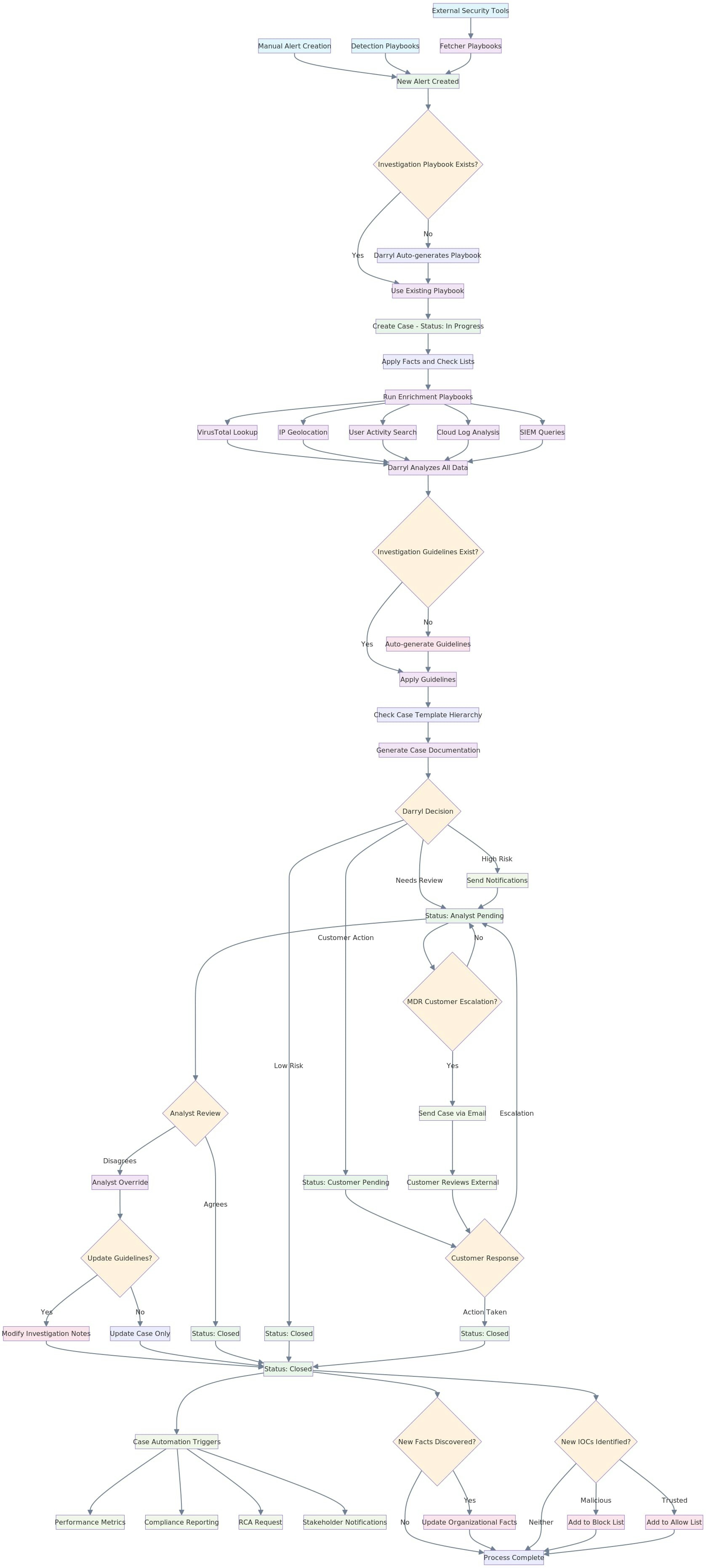 **Key outputs per case**
* 📄 Executive summary & timeline
* 🧠 Enrichment findings and rationale
* ✅ Final disposition with next steps
* 🔔 Stakeholder notifications (Slack/Email)
## 🧩 Core concepts & modules
### 📬 Alerts (ingest & normalize)
**What:** Incoming detections from your tools (IDP, EDR, SIEM, Email, Cloud, SaaS).\
**How:** Pulled via **Integrations** with least-privilege scopes; normalized and de-duplicated.\
**Key fields:** source/provider, rule/signature, severity, entities (user/device/IP/app), artifacts (hash/domain/url), timestamps, correlation keys.\
\
🔌 **Integrations:** Connect your `SIEM/EDR/IDP/email/security` stack for **fetching**, **enrichment**, **federated queries**, and **actions** (e.g., reset account, block IP, ticketing).\
→ Integrations Catalog & Setup Guide: [Integrations Overview](https://docs.airmdr.com/Integrations/overview)
### 🧠 Facts and🚦Allow/Block Lists:
* **Facts:** Durable, structured assertions about entities (users, IPs, apps, assets) that add business context to investigations and explains why something might be benign or risky, reducing false positives and speeding decisions.
* **Allow/Block Lists:** Canonical lists labeling indicators (IPs, domains, URLs, hashes, emails, device IDs) as **Allowed** (benign/expected) or **Blocked** (malicious/forbidden).
**Facts** supply context; **Allow/Block Lists** set disposition shortcuts. Both feed Guidelines and Darryl’s learning loop to deliver faster, consistent, auditable decisions.
### 🛠️ Playbooks
**What:** Opinionated automation for **investigation**, **detection**, and **case operations**.\
**Trigger:** On alert arrival (event/schedule) or on analyst command.\
**Modes:** Use existing playbook for the alert/provider, or\
**Auto-generate** via **Darryl** from plain English / alert context.\
**What they do:** Run enrichments (IDP/EDR/SIEM/cloud/email), correlate signals, request approvals (Pause-and-Wait), and execute scoped actions (e.g., revoke sessions, block IP).\
**Output to Case:** evidence, rationale, proposed decision (**Low / Needs Review / High**), and next steps.\
→ Read more: [AirMDR Playbooks](https://docs.airmdr.com/essentials/AirMDR-Playbooks)
**Key outputs per case**
* 📄 Executive summary & timeline
* 🧠 Enrichment findings and rationale
* ✅ Final disposition with next steps
* 🔔 Stakeholder notifications (Slack/Email)
## 🧩 Core concepts & modules
### 📬 Alerts (ingest & normalize)
**What:** Incoming detections from your tools (IDP, EDR, SIEM, Email, Cloud, SaaS).\
**How:** Pulled via **Integrations** with least-privilege scopes; normalized and de-duplicated.\
**Key fields:** source/provider, rule/signature, severity, entities (user/device/IP/app), artifacts (hash/domain/url), timestamps, correlation keys.\
\
🔌 **Integrations:** Connect your `SIEM/EDR/IDP/email/security` stack for **fetching**, **enrichment**, **federated queries**, and **actions** (e.g., reset account, block IP, ticketing).\
→ Integrations Catalog & Setup Guide: [Integrations Overview](https://docs.airmdr.com/Integrations/overview)
### 🧠 Facts and🚦Allow/Block Lists:
* **Facts:** Durable, structured assertions about entities (users, IPs, apps, assets) that add business context to investigations and explains why something might be benign or risky, reducing false positives and speeding decisions.
* **Allow/Block Lists:** Canonical lists labeling indicators (IPs, domains, URLs, hashes, emails, device IDs) as **Allowed** (benign/expected) or **Blocked** (malicious/forbidden).
**Facts** supply context; **Allow/Block Lists** set disposition shortcuts. Both feed Guidelines and Darryl’s learning loop to deliver faster, consistent, auditable decisions.
### 🛠️ Playbooks
**What:** Opinionated automation for **investigation**, **detection**, and **case operations**.\
**Trigger:** On alert arrival (event/schedule) or on analyst command.\
**Modes:** Use existing playbook for the alert/provider, or\
**Auto-generate** via **Darryl** from plain English / alert context.\
**What they do:** Run enrichments (IDP/EDR/SIEM/cloud/email), correlate signals, request approvals (Pause-and-Wait), and execute scoped actions (e.g., revoke sessions, block IP).\
**Output to Case:** evidence, rationale, proposed decision (**Low / Needs Review / High**), and next steps.\
→ Read more: [AirMDR Playbooks](https://docs.airmdr.com/essentials/AirMDR-Playbooks)
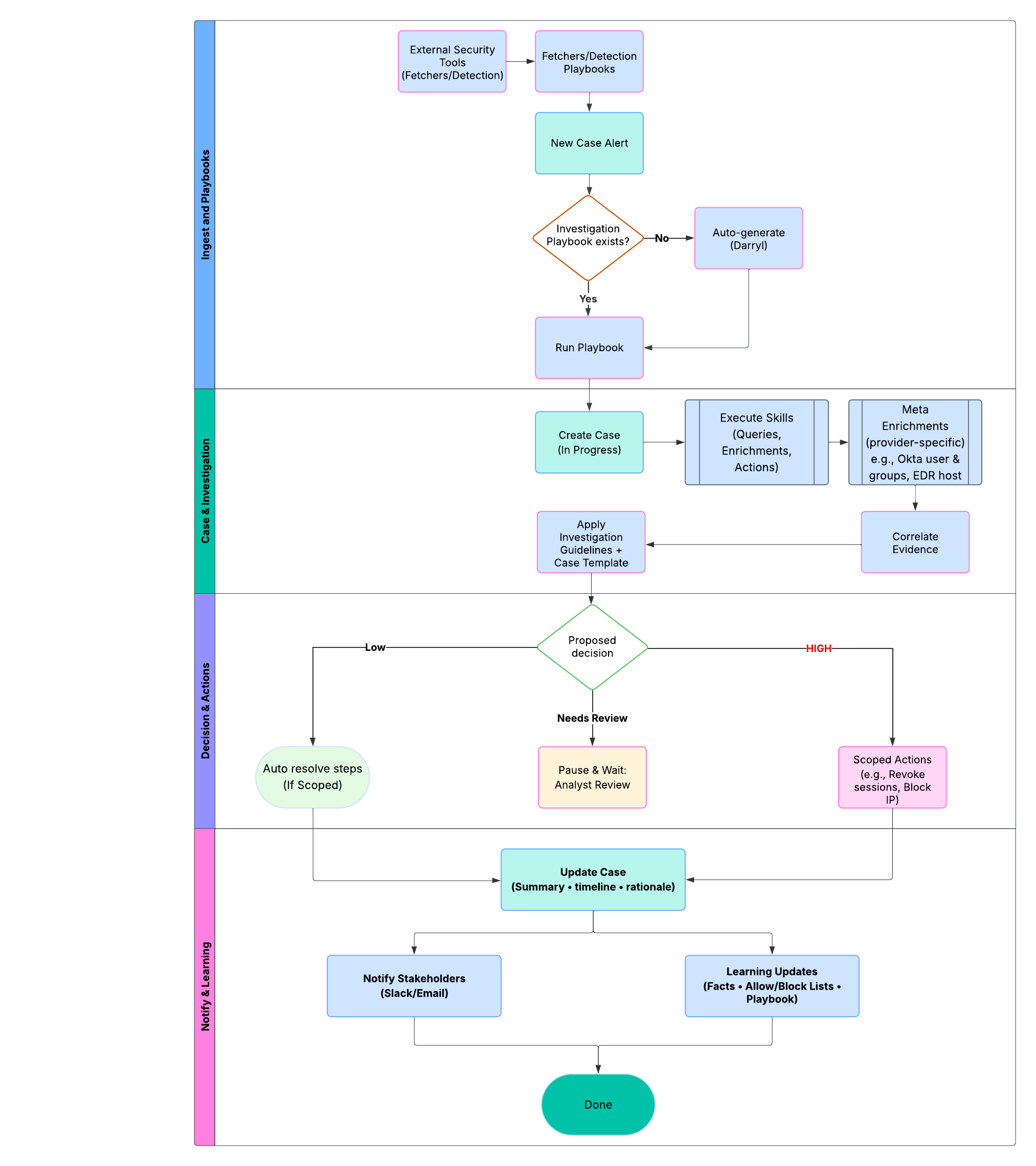 ### 🤖 “Darryl” — AI Virtual Analyst (Agentic Investigation–Capable)
Darryl turns plain-English instructions and incoming alerts into step-by-step investigations, selecting the right skills, explaining each action, and producing a clear, auditable decision.
* 🛠️ **Automates investigations:** Runs Playbooks, enrichment, and containment steps across your tools.
* 🧠 **Chooses the right skills:** Picks queries/actions (IDP, EDR, SIEM, cloud, email) based on alert context.
* 📝 **Explains rationale:** Captures “why” for each step and the final decision (Low / Needs Review / High).
* 🔁 **Learns with feedback:** Improves using **Facts** and **Allow/Block Lists** plus analyst overrides.
* 🔔 **Keeps teams in sync:** Pushes updates/approvals to Slack/Email; links back to the exact case step.
1. Ingest alert or analyst prompt.
2. Select/generate an **Investigation Playbook.**
3. Run enrichments & checks (respecting **Guidelines**).
4. Propose decision + next steps.
5. Notify, request approval if needed.
6. Record everything in the **Case** and update org knowledge.
* 🧩 **Guidelines first:** Deterministic rules set boundaries for decisions and actions.
* 👤 **Human-in-the-loop:** Analysts can approve, modify, or stop actions at checkpoints.
* 🕵️ **Auditability:** Every query, action, rationale, and notification is written to the case timeline.
* 🔐 **Least privilege:** Uses scoped credentials from **Integrations** and **Vault**.
**Inputs the agent considers**
* ✍️ **Investigation Notes** (Guardrails that define *how* AirMDR investigates and the criteria for making decisions (e.g., Low / Needs Review / High))
* **Inputs:** fields from alert/case/enrichment (user, IP, hash, app, risk score, etc.)
* **Context:** **Facts** and **Allow/Block Lists** (e.g., red-team IPs, sanctioned domains)
* **Conditions:** boolean checks, thresholds, pattern matches
* **Actions:** run skills (extra queries, containment), request approvals
* **Outcome mapping:** set decision (Low / Needs Review / High) + next steps
* 🧠 **Facts** (durable org context) + 🚦 **Allow/Block Lists**
* 🧩 **Case Templates** (Reusable layouts that standardize how case reports and sections are written and presented)
* 🔎 **Meta Playbook Findings** (extra, tool-specific enrichments derived from the alert JSON)
- *Okta:* Get user details, group memberships, recent sign-ins, MFA enrollment, app assignments
- *EDR:* Device posture, recent detections on host, isolation status
- *SIEM:* Correlated events in time-window, peer activity
- *Cloud:* IAM role changes, last-modified policies, risky API calls
1. Parse **alert JSON** + analyst **notes**
2. Pull **Facts** / **Allow/Block** Lists
3. Execute **meta enrichments** (provider-specific deep dives)
4. Evaluate **Guidelines** (deterministic checks/thresholds)
5. Synthesize findings → propose **decision** + actions
6. Apply **Case Template** to generate a clean, exec-ready narrative
7. Emit **notifications/approvals** (Slack/Email) as configured
8. Write all steps, rationale, and artifacts to the **case timeline**
## 📁 Case Management
**What:** The system of record for the investigation.\
**Lifecycle:** *Created/updated from alert* → enrichment evidence → guideline checks → human/auto decision → notifications → **Closed**.\
**Anatomy:** executive summary, timeline (all steps & approvals), findings/rationale, actions taken, attachments, audit trail.\
**States:** In Progress · Analyst Pending · Customer Pending · Closed.\
**Comms:** Slack/Email updates and approvals; deep links back to the exact timeline step.\
**Governance:** Role-based access, redaction controls, full auditability.
### 💬 Communication & Collaboration
In-case comments, approvals, and **Slack/Email** notifications so the right people are looped in at the right time.
🔗 **How they fit together**
* End-to-End Sequence (at a glance)
1. **Alert ingested** via Integrations → normalized & de-duplicated
2. **Eligibility checks** (Facts / Allow-Block short-circuit where applicable)
3. **Playbook selected or auto-generated** (Darryl)
4. **Agentic investigation:** notes + Facts + meta enrichments → **Guidelines** → decision/actions
5. **Case updated** (summary, timeline, rationale, artifacts)
6. **Notify/approve** in Slack/Email → execute actions as scoped
7. **Close case** (or handoff) → learning updates (Facts, Allow/Block)
**Quick start (recommended sequence)**
1. **Pick 2–3 high-volume alert types**; draft *minimal* guidelines per type.
2. **Create a concise org-default template**; add a provider-level variant for one source.
3. **Run a 7-day pilot,** review 10–20 cases; capture false-positive reasons as **Facts** or **Allow List** entries.
4. **Tighten thresholds** in guidelines; trim template text; keep summary first.
5. **Enable notifications** for decision changes and SLA risks.
6. **Schedule monthly reviews** of metrics and guideline efficacy.
### 🔐 Vault (secure credential intake)
Secure, auditable way to collect **investigation credentials** from customers (e.g., temporary API keys, jump-box creds) via **one-time, expiring links** so analysts can complete time-bound checks without sharing secrets over email/Slack.\
→ Read more: [Vault](https://docs.airmdr.com/essentials/vault)
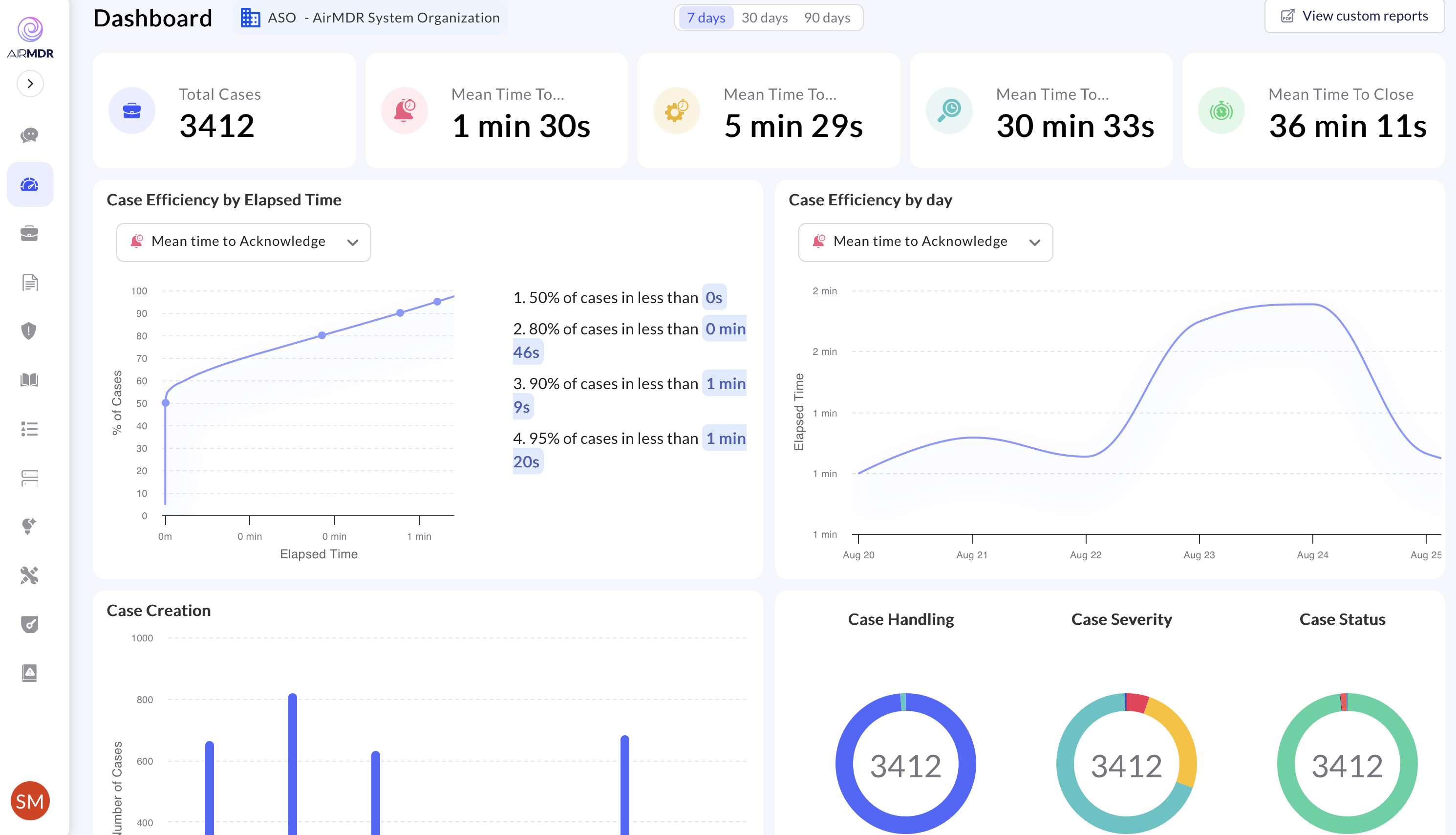
### 📊 Dashboard & Trends
A real-time, role-aware view of investigations and automation performance so user can spot hotspots, track SLAs, and prioritize improvements without digging through individual cases.
### 🤖 “Darryl” — AI Virtual Analyst (Agentic Investigation–Capable)
Darryl turns plain-English instructions and incoming alerts into step-by-step investigations, selecting the right skills, explaining each action, and producing a clear, auditable decision.
* 🛠️ **Automates investigations:** Runs Playbooks, enrichment, and containment steps across your tools.
* 🧠 **Chooses the right skills:** Picks queries/actions (IDP, EDR, SIEM, cloud, email) based on alert context.
* 📝 **Explains rationale:** Captures “why” for each step and the final decision (Low / Needs Review / High).
* 🔁 **Learns with feedback:** Improves using **Facts** and **Allow/Block Lists** plus analyst overrides.
* 🔔 **Keeps teams in sync:** Pushes updates/approvals to Slack/Email; links back to the exact case step.
1. Ingest alert or analyst prompt.
2. Select/generate an **Investigation Playbook.**
3. Run enrichments & checks (respecting **Guidelines**).
4. Propose decision + next steps.
5. Notify, request approval if needed.
6. Record everything in the **Case** and update org knowledge.
* 🧩 **Guidelines first:** Deterministic rules set boundaries for decisions and actions.
* 👤 **Human-in-the-loop:** Analysts can approve, modify, or stop actions at checkpoints.
* 🕵️ **Auditability:** Every query, action, rationale, and notification is written to the case timeline.
* 🔐 **Least privilege:** Uses scoped credentials from **Integrations** and **Vault**.
**Inputs the agent considers**
* ✍️ **Investigation Notes** (Guardrails that define *how* AirMDR investigates and the criteria for making decisions (e.g., Low / Needs Review / High))
* **Inputs:** fields from alert/case/enrichment (user, IP, hash, app, risk score, etc.)
* **Context:** **Facts** and **Allow/Block Lists** (e.g., red-team IPs, sanctioned domains)
* **Conditions:** boolean checks, thresholds, pattern matches
* **Actions:** run skills (extra queries, containment), request approvals
* **Outcome mapping:** set decision (Low / Needs Review / High) + next steps
* 🧠 **Facts** (durable org context) + 🚦 **Allow/Block Lists**
* 🧩 **Case Templates** (Reusable layouts that standardize how case reports and sections are written and presented)
* 🔎 **Meta Playbook Findings** (extra, tool-specific enrichments derived from the alert JSON)
- *Okta:* Get user details, group memberships, recent sign-ins, MFA enrollment, app assignments
- *EDR:* Device posture, recent detections on host, isolation status
- *SIEM:* Correlated events in time-window, peer activity
- *Cloud:* IAM role changes, last-modified policies, risky API calls
1. Parse **alert JSON** + analyst **notes**
2. Pull **Facts** / **Allow/Block** Lists
3. Execute **meta enrichments** (provider-specific deep dives)
4. Evaluate **Guidelines** (deterministic checks/thresholds)
5. Synthesize findings → propose **decision** + actions
6. Apply **Case Template** to generate a clean, exec-ready narrative
7. Emit **notifications/approvals** (Slack/Email) as configured
8. Write all steps, rationale, and artifacts to the **case timeline**
## 📁 Case Management
**What:** The system of record for the investigation.\
**Lifecycle:** *Created/updated from alert* → enrichment evidence → guideline checks → human/auto decision → notifications → **Closed**.\
**Anatomy:** executive summary, timeline (all steps & approvals), findings/rationale, actions taken, attachments, audit trail.\
**States:** In Progress · Analyst Pending · Customer Pending · Closed.\
**Comms:** Slack/Email updates and approvals; deep links back to the exact timeline step.\
**Governance:** Role-based access, redaction controls, full auditability.
### 💬 Communication & Collaboration
In-case comments, approvals, and **Slack/Email** notifications so the right people are looped in at the right time.
🔗 **How they fit together**
* End-to-End Sequence (at a glance)
1. **Alert ingested** via Integrations → normalized & de-duplicated
2. **Eligibility checks** (Facts / Allow-Block short-circuit where applicable)
3. **Playbook selected or auto-generated** (Darryl)
4. **Agentic investigation:** notes + Facts + meta enrichments → **Guidelines** → decision/actions
5. **Case updated** (summary, timeline, rationale, artifacts)
6. **Notify/approve** in Slack/Email → execute actions as scoped
7. **Close case** (or handoff) → learning updates (Facts, Allow/Block)
**Quick start (recommended sequence)**
1. **Pick 2–3 high-volume alert types**; draft *minimal* guidelines per type.
2. **Create a concise org-default template**; add a provider-level variant for one source.
3. **Run a 7-day pilot,** review 10–20 cases; capture false-positive reasons as **Facts** or **Allow List** entries.
4. **Tighten thresholds** in guidelines; trim template text; keep summary first.
5. **Enable notifications** for decision changes and SLA risks.
6. **Schedule monthly reviews** of metrics and guideline efficacy.
### 🔐 Vault (secure credential intake)
Secure, auditable way to collect **investigation credentials** from customers (e.g., temporary API keys, jump-box creds) via **one-time, expiring links** so analysts can complete time-bound checks without sharing secrets over email/Slack.\
→ Read more: [Vault](https://docs.airmdr.com/essentials/vault)
### 📊 Dashboard & Trends
A real-time, role-aware view of investigations and automation performance so user can spot hotspots, track SLAs, and prioritize improvements without digging through individual cases.
 ## 🔐 AirMDR Security & data handling (at a glance)
* **Integrations-first:** Query what you need when you need it; minimize data copying.
* **Scoped access:** Use least-privilege roles/API keys per tool.
* **Vaulted secrets:** One-time, encrypted submission with audit trails.
* **Auditability:** Every automated step and human action is recorded in the case.
For implementation specifics, see the relevant integration pages and the [API reference](https://docs.airmdr.com/api-reference/apilandingpage).
## Getting started
**AirMDR Quick Start: Recommended Sequence**
1. 🔑 **Access the Platform**\
Log in to AirMDR in your web browser with your org credentials.
2. **Create org & users** (SSO optional).
3. 🔌 **Connect Your Tools**\
Set up **Integrations** with your existing security stack (IDP, EDR, SIEM, email, cloud, SaaS) to enable enrichment and actions.
4. 📥 **Enable an Alert-Triage Playbook** (schedule or trigger)\
Create **Fetcher Playbooks** to automatically pull alerts from connected sources on a schedule or trigger → Read more: [AirMDR Playbooks](https://docs.airmdr.com/essentials/AirMDR-Playbooks).
5. 🧭 **Customize Guidelines & Templates**\
Seed organizational context like Facts, Allow/Block Lists and define **Investigation Guidelines** (how to decide) and **Case Templates** (how to write it up) at org/provider/alert levels for consistent, auditable outcomes.
6. **Wire up notifications** to Slack/Email and ticketing as needed.
7. 📊 **Monitor Performance**\
Use **Dashboard & Trends** to track volumes, MTTI/MTTR, automation coverage, SLA health, and noisy sources; iterate weekly.
## 🎯 AirMDR Impact: What “Good” Looks Like
* **Consistent investigations** with clear, defensible decisions.
* **Lower manual toil** through playbook-driven enrichment and actions.
* **Faster time-to-decision** on routine alerts; analysts focus on true positives.
* **Better signal quality** over time via Facts and Allow/Block feedback loops.
* **Stakeholder trust** through standardized reports and proactive notifications.
## 📚 Glossary
| **Title** | Description |
| --------------------- | ------------------------------------------------ |
| **Playbook** | Automated sequence to investigate/detect/respond |
| **Skill** | A reusable action step (query, enrich, act) |
| **Guidelines** | Decision logic for a given alert/provider/org |
| **Template** | Case write-up structure |
| **Facts** | Long-lived business context |
| **Allow/Block Lists** | Indicator classification for decision shortcuts |
## 🔐 AirMDR Security & data handling (at a glance)
* **Integrations-first:** Query what you need when you need it; minimize data copying.
* **Scoped access:** Use least-privilege roles/API keys per tool.
* **Vaulted secrets:** One-time, encrypted submission with audit trails.
* **Auditability:** Every automated step and human action is recorded in the case.
For implementation specifics, see the relevant integration pages and the [API reference](https://docs.airmdr.com/api-reference/apilandingpage).
## Getting started
**AirMDR Quick Start: Recommended Sequence**
1. 🔑 **Access the Platform**\
Log in to AirMDR in your web browser with your org credentials.
2. **Create org & users** (SSO optional).
3. 🔌 **Connect Your Tools**\
Set up **Integrations** with your existing security stack (IDP, EDR, SIEM, email, cloud, SaaS) to enable enrichment and actions.
4. 📥 **Enable an Alert-Triage Playbook** (schedule or trigger)\
Create **Fetcher Playbooks** to automatically pull alerts from connected sources on a schedule or trigger → Read more: [AirMDR Playbooks](https://docs.airmdr.com/essentials/AirMDR-Playbooks).
5. 🧭 **Customize Guidelines & Templates**\
Seed organizational context like Facts, Allow/Block Lists and define **Investigation Guidelines** (how to decide) and **Case Templates** (how to write it up) at org/provider/alert levels for consistent, auditable outcomes.
6. **Wire up notifications** to Slack/Email and ticketing as needed.
7. 📊 **Monitor Performance**\
Use **Dashboard & Trends** to track volumes, MTTI/MTTR, automation coverage, SLA health, and noisy sources; iterate weekly.
## 🎯 AirMDR Impact: What “Good” Looks Like
* **Consistent investigations** with clear, defensible decisions.
* **Lower manual toil** through playbook-driven enrichment and actions.
* **Faster time-to-decision** on routine alerts; analysts focus on true positives.
* **Better signal quality** over time via Facts and Allow/Block feedback loops.
* **Stakeholder trust** through standardized reports and proactive notifications.
## 📚 Glossary
| **Title** | Description |
| --------------------- | ------------------------------------------------ |
| **Playbook** | Automated sequence to investigate/detect/respond |
| **Skill** | A reusable action step (query, enrich, act) |
| **Guidelines** | Decision logic for a given alert/provider/org |
| **Template** | Case write-up structure |
| **Facts** | Long-lived business context |
| **Allow/Block Lists** | Indicator classification for decision shortcuts |