> ## Documentation Index
> Fetch the complete documentation index at: https://docs.airmdr.com/llms.txt
> Use this file to discover all available pages before exploring further.
# AirMDR RBAC — Organization Requirements
> This document presents a formal, organization-level specification of AirMDR role-based access control (RBAC). It consolidates org-management requirements into a prescriptive model that defines roles, permissions, cross-organization policy flags, inheritance and resolution rules, and supported migration scenarios. The objective is to enable security, operations, and customer administrators to implement consistent, least-privilege access across parent and child organizations within AirMDR.
### Role-Based Access Control: Key Concepts
* **Role assignment**\
A user must be assigned one or more roles **in a specific organization** to receive permissions.
* **Role authorization**\
Only roles defined and approved by the organization can be assigned. Unapproved roles confer no rights.
* **Transaction authorization**\
An action (e.g., read, run, publish, manage) is allowed only if it is permitted by at least one of the user’s assigned roles **in the active organization** and, when crossing org boundaries, by the relevant policy flags.
Role-based access control (RBAC) is a security model that grants permissions to **roles**, and assigns **users** to those roles. Users gain the union of permissions from their roles—within a specific organization context.
* Define roles (e.g., Org Admin, Default).
* Map permissions to roles (e.g., manage users, run playbooks).
* Assign users to roles in an org (and any permitted child orgs).
* At runtime, the platform authorizes each action by checking the user’s roles **in that org** and the org’s cross-organization policies.
Access control is the set of policies and checks that determine **who** can access **which** resources and **what** actions they can perform, evaluated at request time in the correct org context.
A permission is an allowed action on a resource (e.g., “run playbook”, “view alerts”, “manage users”). Permissions are **not** granted directly to users; they are granted to **roles**, which users receive through assignment.
A role is a named bundle of permissions that represents a job function in an organization (e.g., Org Admin, User).
* Least-privilege by design
* Consistent, auditable entitlements
* Faster onboarding (assign roles instead of hand-building entitlements)
* Clear separation between **who a user is** and **what they can do** in each org context
A permission is an allowed action on a resource (e.g., *view alerts*, *run playbooks*, *manage users*). Permissions are **not granted directly to users**; they are granted to **roles**, and users obtain them **through role assignment**.
## AirMDR RBAC Model
AirMDR implements RBAC at the **organization** level and extends it with **cross-organization visibility policies** for parent/child hierarchies (e.g., provider→customer). Each org maintains a single RBAC record that captures identity, features in use, and policy scopes.
### Policy scopes (org-level visibility)
Each organization’s RBAC record contains three policy objects that control data sharing:
* **parent\_visibility** — what a parent (e.g., ASO (AirMDR Systems Organization)/MSSP (Managed Security Service Provider)) may see or do in the child org.
If an organization is not configured as an MSSP (Managed Security Service Provider), it is treated as a child organization under the ASO (AirMDR Systems Organization) by default.
* **child\_visibility** — what the child org may view/consume from the parent (e.g., shared content, connections).
* **org\_visibility** — what the org itself chooses to expose to others even if the parent shares broadly.
/ac
Access levels are expressed with string enums for clarity and future extensibility:
* `full_access` — normal view/operate rights as defined by the user’s role in the target org.
* `usage_access` — execute/read-only usage of shared assets (e.g., run a shared playbook, use a shared connection); **no edits**.
* `no_access` — no visibility or usage rights.
The current operational model uses a consolidated **org\_data** key to gate most data types (alerts, cases, playbooks, templates, notes), keeping dependent entities aligned while the backend still supports finer granularity if needed.
### Organization Types (Presets) and Structure
Choose **one preset** when creating a child org (refinable later by flags).
When a child org is created, an **org type** preset applies safe defaults for these flags; admins can refine flags later.
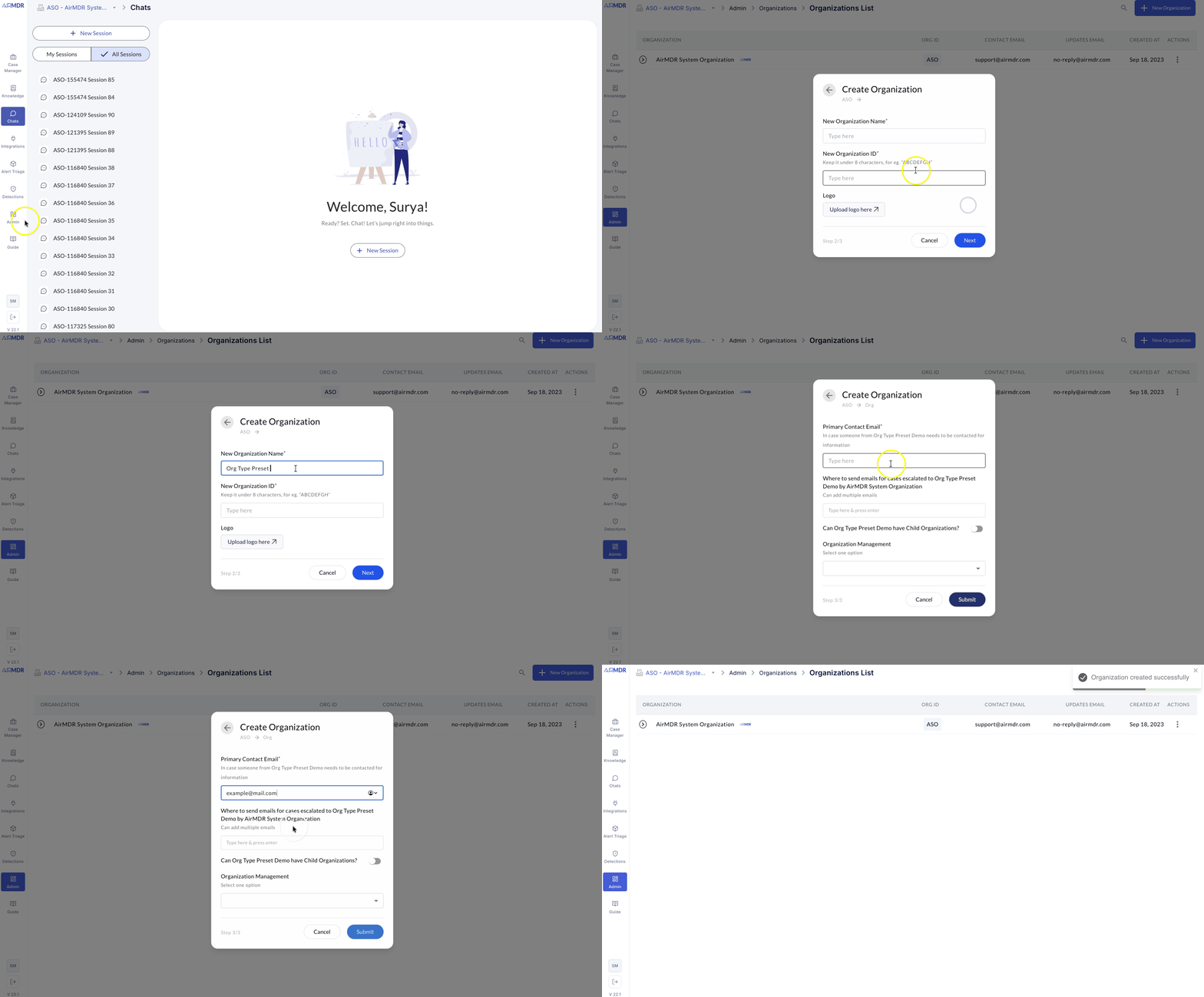 \
Preset availability and `can_have_child_orgs`
* Presets shown at org creation are determined by the **structural** flag `can_have_child_orgs` (this flag is **non-editable**).
* If `can_have_child_orgs = false`, the org is a **leaf** and only **leaf-appropriate** presets are available.
* If `can_have_child_orgs = true`, the org can **host children** and **host-capable** presets are available.
| Org Type | can\_have\_child\_orgs | Parent→Org (typical) | Org→Parent (typical) | Intended use |
| :---------------------------------------------------------------------- | ---------------------- | :---------------------------------------------------------------------- | :------------------------------------ | :------------------------------------------------------------------------------ |
| **MDR Service Customer** | false | Full access to org data and user management | View & Usage of shared assets | Fully managed customer |
| **Free-Tier Customer** | false | User-management with **limited** visibility to entities as per contract | View of shared assets | Trials/limited evaluations |
| **MSSP (Managed Security Service Provider) relying on AirMDR for data** | true | User-management with **limited** visibility to entities as per contract | Usage of shared assets (execute-only) | MSSP (Managed Security Service Provider) consumes provider assets without edits |
### Roles list and Capabilities
**Superadmin (platform scope)**
* **Scope:** platform-level administration (outside any single org’s data plane).
* **Can:** create/re-parent/archive organizations; apply presets; set org-level policy flags at creation.
* **Cannot:** access org data by default; data access still requires a role **within** that org and applicable policy flags.
**Org Admin (per-org)**
* **User & Group Management:** create/disable users; assign roles; manage groups.
* **Connections:** create/update/delete org-local connections; set least-privilege scopes.
* **Content Governance:** manage playbook scope (Personal/Org/Shared); publish content owned by the org.
* **Org Controls:** where permitted, adjust org’s policy flags that are editable; context switch to permitted descendants.
* **Read/Operate:** full read and operational actions as allowed by org policy.
**User (per-org)**
* **Alerts & Cases:** view alerts; create/update/assign/close cases; add notes/evidence.
* **Playbooks:** run playbooks; trigger activations where allowed.
* **Connections:** use approved connections in playbooks.
* **Read:** dashboards, alerts, cases, execution history; **no** write actions.
### Cross-Organization Policy Flags (what they define)
These flags determine **visibility and usage** when data or assets cross organizational boundaries:
* **Parent → Org: Org & User Management** — `full_access` / `no_access`\
*Whether the parent can manage users and org administration tasks in the org.*
* **Parent → Org: Entities** — `full_access` / `no_access`\
*Whether the parent can view/operate on the org’s entities (alerts, cases, playbooks) in accordance with role permissions.*
* **Org → Parent: Connections** — `usage_access` / `no_access`\
*****Whether the org can use (execute-only) the parent’s connections.*****
* **Org → Parent: LLM Keys** — `usage_access` / `no_access`\
*****Whether the org can use the parent’s LLM keys for allowed operations.*****
* **Org → Parent: Shared Content** — `usage_access` / `no_access`\
*****Whether the org can use (execute/read-only) the parent’s shared playbooks/rules.*****
### Policy Matrices (what they are)
Policy matrices summarize **who can see/use what across org boundaries**. They do **not** change role definitions; they determine if cross-org access is **visible/usable** at all.
| Flag | ASO (AirMDR Systems Organization) sees child data | Counted in ASO (AirMDR Systems Organization) metrics | Child sees ASO (AirMDR Systems Organization) shared |
| :------------------- | :------------------------------------------------ | :--------------------------------------------------- | :-------------------------------------------------- |
| No Access | No | No | No |
| Full | Yes | **Yes** | — |
| View & Usage (child) | — | — | View/Execute only |
### Effective Access (User × Org)
| User Role | Parent Flags | Result in Child |
| :-------- | :---------------------------- | :------------------------------------------------- |
| Org Admin | Full | Context switch; **full** view + actions per role |
| User | View & Usage (shared content) | Can **run** shared playbooks; **cannot edit** them |
## Access decisions (how the platform evaluates a request)
At request time, AirMDR authorizes an operation by checking:
1. **Role permissions in the target org** (does the user’s assigned role allow the action on the resource?), and
2. **Relevant policy flags** if the request crosses org boundaries (does policy allow *Full* or *Usage* as required?).
The operation succeeds only if **both** conditions pass.\
*(Internal traversal/resolution details are omitted here as they are implementation-specific.)*
## Summary
AirMDR applies standard RBAC fundamentals—**role assignment, role authorization, and transaction authorization**—to a multi-org environment with explicit cross-org visibility flags. Presets (e.g., MDR Service Customer, Free-Tier, MSSP (Managed Security Service Provider) relying on AirMDR for data) provide safe defaults, and access decisions are computed by combining **role permissions** with **parent/child policy scopes** in the active organization context.
## Support
For additional assistance:
* Contact [**AirMDR Support**](mailto:support@airmdr.com) through your designated support channel.
\
Preset availability and `can_have_child_orgs`
* Presets shown at org creation are determined by the **structural** flag `can_have_child_orgs` (this flag is **non-editable**).
* If `can_have_child_orgs = false`, the org is a **leaf** and only **leaf-appropriate** presets are available.
* If `can_have_child_orgs = true`, the org can **host children** and **host-capable** presets are available.
| Org Type | can\_have\_child\_orgs | Parent→Org (typical) | Org→Parent (typical) | Intended use |
| :---------------------------------------------------------------------- | ---------------------- | :---------------------------------------------------------------------- | :------------------------------------ | :------------------------------------------------------------------------------ |
| **MDR Service Customer** | false | Full access to org data and user management | View & Usage of shared assets | Fully managed customer |
| **Free-Tier Customer** | false | User-management with **limited** visibility to entities as per contract | View of shared assets | Trials/limited evaluations |
| **MSSP (Managed Security Service Provider) relying on AirMDR for data** | true | User-management with **limited** visibility to entities as per contract | Usage of shared assets (execute-only) | MSSP (Managed Security Service Provider) consumes provider assets without edits |
### Roles list and Capabilities
**Superadmin (platform scope)**
* **Scope:** platform-level administration (outside any single org’s data plane).
* **Can:** create/re-parent/archive organizations; apply presets; set org-level policy flags at creation.
* **Cannot:** access org data by default; data access still requires a role **within** that org and applicable policy flags.
**Org Admin (per-org)**
* **User & Group Management:** create/disable users; assign roles; manage groups.
* **Connections:** create/update/delete org-local connections; set least-privilege scopes.
* **Content Governance:** manage playbook scope (Personal/Org/Shared); publish content owned by the org.
* **Org Controls:** where permitted, adjust org’s policy flags that are editable; context switch to permitted descendants.
* **Read/Operate:** full read and operational actions as allowed by org policy.
**User (per-org)**
* **Alerts & Cases:** view alerts; create/update/assign/close cases; add notes/evidence.
* **Playbooks:** run playbooks; trigger activations where allowed.
* **Connections:** use approved connections in playbooks.
* **Read:** dashboards, alerts, cases, execution history; **no** write actions.
### Cross-Organization Policy Flags (what they define)
These flags determine **visibility and usage** when data or assets cross organizational boundaries:
* **Parent → Org: Org & User Management** — `full_access` / `no_access`\
*Whether the parent can manage users and org administration tasks in the org.*
* **Parent → Org: Entities** — `full_access` / `no_access`\
*Whether the parent can view/operate on the org’s entities (alerts, cases, playbooks) in accordance with role permissions.*
* **Org → Parent: Connections** — `usage_access` / `no_access`\
*****Whether the org can use (execute-only) the parent’s connections.*****
* **Org → Parent: LLM Keys** — `usage_access` / `no_access`\
*****Whether the org can use the parent’s LLM keys for allowed operations.*****
* **Org → Parent: Shared Content** — `usage_access` / `no_access`\
*****Whether the org can use (execute/read-only) the parent’s shared playbooks/rules.*****
### Policy Matrices (what they are)
Policy matrices summarize **who can see/use what across org boundaries**. They do **not** change role definitions; they determine if cross-org access is **visible/usable** at all.
| Flag | ASO (AirMDR Systems Organization) sees child data | Counted in ASO (AirMDR Systems Organization) metrics | Child sees ASO (AirMDR Systems Organization) shared |
| :------------------- | :------------------------------------------------ | :--------------------------------------------------- | :-------------------------------------------------- |
| No Access | No | No | No |
| Full | Yes | **Yes** | — |
| View & Usage (child) | — | — | View/Execute only |
### Effective Access (User × Org)
| User Role | Parent Flags | Result in Child |
| :-------- | :---------------------------- | :------------------------------------------------- |
| Org Admin | Full | Context switch; **full** view + actions per role |
| User | View & Usage (shared content) | Can **run** shared playbooks; **cannot edit** them |
## Access decisions (how the platform evaluates a request)
At request time, AirMDR authorizes an operation by checking:
1. **Role permissions in the target org** (does the user’s assigned role allow the action on the resource?), and
2. **Relevant policy flags** if the request crosses org boundaries (does policy allow *Full* or *Usage* as required?).
The operation succeeds only if **both** conditions pass.\
*(Internal traversal/resolution details are omitted here as they are implementation-specific.)*
## Summary
AirMDR applies standard RBAC fundamentals—**role assignment, role authorization, and transaction authorization**—to a multi-org environment with explicit cross-org visibility flags. Presets (e.g., MDR Service Customer, Free-Tier, MSSP (Managed Security Service Provider) relying on AirMDR for data) provide safe defaults, and access decisions are computed by combining **role permissions** with **parent/child policy scopes** in the active organization context.
## Support
For additional assistance:
* Contact [**AirMDR Support**](mailto:support@airmdr.com) through your designated support channel.