

Purpose
The AirMDR Remote Agent (RA) is a lightweight, secure client that runs inside a customer’s private environment and enables AirMDR to collect logs and execute controlled data requests without requiring inbound network access. It is designed for environments where:- Inbound connectivity is restricted
- VPNs are not permitted
- Direct cloud-to-SIEM access is disallowed
Deployment Model
-
Installed on:
- A Jump Box, or
- A Windows/Linux endpoint inside the customer network
- Operates entirely via outbound-only connections
- Requires no inbound firewall rules
-
Uses TLS-encrypted WebSocket (WSS) over port 443
This design aligns with common enterprise security policies that prohibit inbound connections to internal systems.
High-Level Architecture
Architecture at a Glance
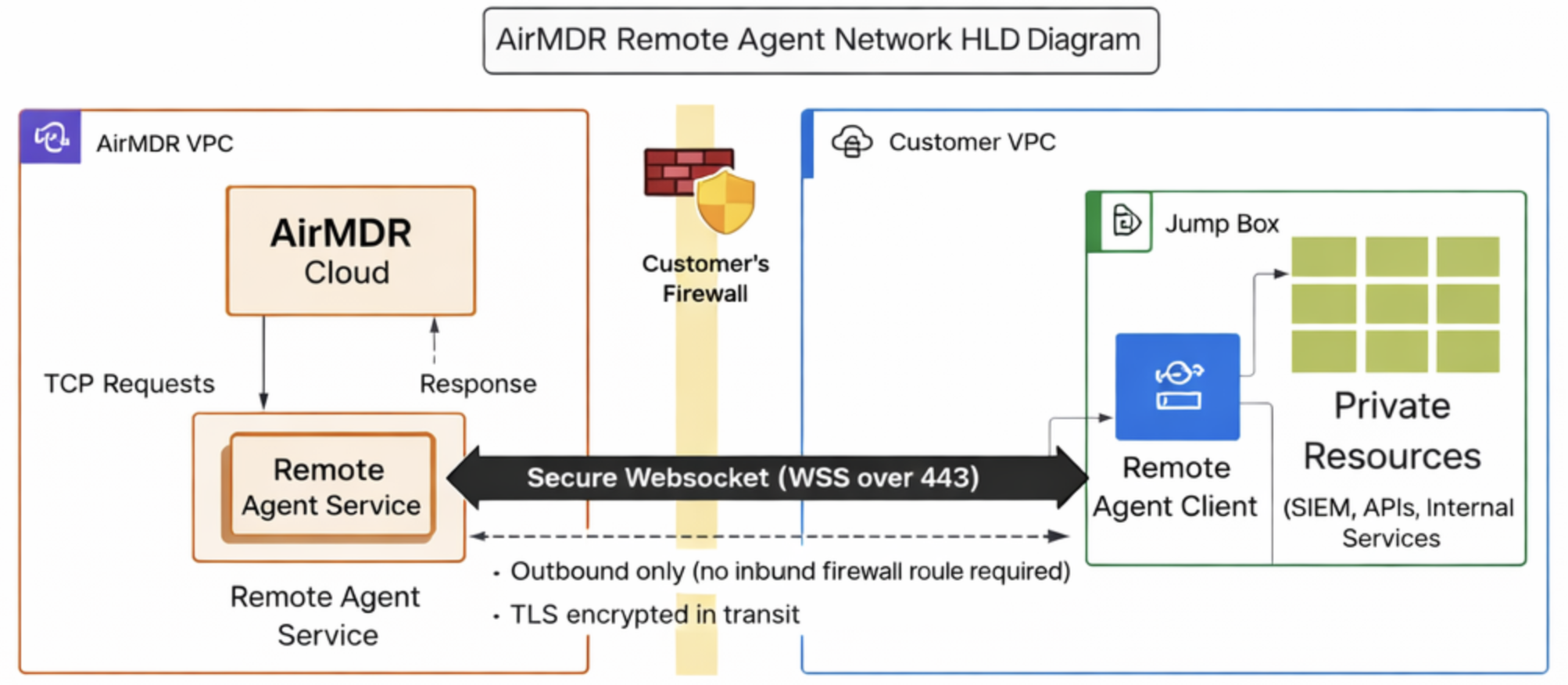
Core Components
1. Remote Agent Client (Customer Environment)
- Written in Go
- Runs as a background service
- Establishes and maintains a persistent WSS connection to AirMDR Cloud
- Persists configuration locally (
config.json) - Responsible for:
- Buffering
- Retry logic
- Checkpointing
- Auto-reconnect
- Heartbeats
2. AirMDR Remote Agent Service (Cloud)
- Acts as a WSS gateway
- Authenticates agent connections
- Sends control commands to agents
- Tracks agent health and connectivity
- Forwards received data into AirMDR’s ingestion pipeline
Communication & Transport Security
- Protocol: Secure WebSocket (WSS)
- Port: 443 (standard HTTPS)
- Encryption: TLS in transit
- Direction: Agent → Cloud only
Why WebSockets?
- Maintains a persistent connection through NATs and firewalls
- Allows near-real-time command and data exchange
- Avoids polling overhead
Data Collection Modes
The AirMDR Remote Agent supports below mentioned ingestion model.PULL-Based Collection (SIEM & APIs)
Used for:- Splunk
- QRadar
- Elastic / OpenSearch
- Other TCP/HTTPS-based APIs
- AirMDR sends a
TCP_REQUESTcommand to the agent - Agent executes the request locally against the SIEM/API
- Results are:
- Batched
- Normalized
- Returned via WSS
- Checkpoints ensure no duplicate data
Internal Agent Architecture
Inside the agent, responsibilities are clearly separated:Transport Layer
- WSS connect + reconnect
- Read/write loops
- Request/response correlation via
request_id - Message dispatching
Command Handler
- Handles control messages such as:
TCP_REQUESTPING
Collector Manager
- SIEM Collector: Executes remote API pulls
Local Buffer (Spooler)
- Durable queue (embedded DB)
- Stores data when offline
- Automatically drains on reconnect
Heartbeat Manager
- Sends periodic
PING - Tracks connection health
- Collects basic system metrics
Heartbeats & Health Monitoring
Heartbeat Purpose
- Detect dropped connections
- Prevent idle timeouts
- Measure agent health
Mechanism
- Agent sends
PINGevery ~30 seconds - Cloud responds with
PONG - Failure handling:
- Reconnect if no
PONGwithin 10 seconds - Agent marked offline after two missed heartbeats
- Reconnect if no
Reliability & Failure Handling
The Remote Agent is designed for unreliable networks:- Automatic reconnect
- Disk-based buffering when offline
- Retry with backoff
- Checkpointing to avoid data loss or duplication
Security Characteristics (Summary)
- Outbound-only traffic
- TLS-encrypted transport
- No inbound firewall rules
- No VPN required
- Credentials never leave customer environment
- Minimal local persistence
- Optional signature-verified auto-updates
Operational Visibility
- Agent reports:
- Online/offline status
- Heartbeat health
- Collector state
- Logs available via systemd / Windows service logs
When Should a Security Engineer Use the Remote Agent?
Use the AirMDR Remote Agent when:- SIEM or logs are not internet-exposed
- Inbound access is prohibited
- API access must originate from inside the network
- Security policy forbids VPNs or tunnels
Summary
The AirMDR Remote Agent provides a secure, resilient, and policy-aligned mechanism to extend AirMDR’s detection and investigation capabilities into private environments—without weakening perimeter security.Support
For additional assistance:- Contact AirMDR Support through your designated support channel.