

Role-Based Access Control: Key Concepts
Three core RBAC rules
Three core RBAC rules
- Role assignment
A user must be assigned one or more roles in a specific organization to receive permissions. - Role authorization
Only roles defined and approved by the organization can be assigned. Unapproved roles confer no rights. - Transaction authorization
An action (e.g., read, run, publish, manage) is allowed only if it is permitted by at least one of the user’s assigned roles in the active organization and, when crossing org boundaries, by the relevant policy flags.
What is role-based access control?
What is role-based access control?
Role-based access control (RBAC) is a security model that grants permissions to roles, and assigns users to those roles. Users gain the union of permissions from their roles—within a specific organization context.
How does RBAC work?
How does RBAC work?
- Define roles (e.g., Org Admin, Default).
- Map permissions to roles (e.g., manage users, run playbooks).
- Assign users to roles in an org (and any permitted child orgs).
- At runtime, the platform authorizes each action by checking the user’s roles in that org and the org’s cross-organization policies.
What is access control?
What is access control?
Access control is the set of policies and checks that determine who can access which resources and what actions they can perform, evaluated at request time in the correct org context.
What is a user permission?
What is a user permission?
A permission is an allowed action on a resource (e.g., “run playbook”, “view alerts”, “manage users”). Permissions are not granted directly to users; they are granted to roles, which users receive through assignment.
What is a role?
What is a role?
A role is a named bundle of permissions that represents a job function in an organization (e.g., Org Admin, User).
Benefits of RBAC
Benefits of RBAC
- Least-privilege by design
- Consistent, auditable entitlements
- Faster onboarding (assign roles instead of hand-building entitlements)
- Clear separation between who a user is and what they can do in each org context
Permission
Permission
A permission is an allowed action on a resource (e.g., view alerts, run playbooks, manage users). Permissions are not granted directly to users; they are granted to roles, and users obtain them through role assignment.
AirMDR RBAC Model
AirMDR implements RBAC at the organization level and extends it with cross-organization visibility policies for parent/child hierarchies (e.g., provider→customer). Each org maintains a single RBAC record that captures identity, features in use, and policy scopes.Policy scopes (org-level visibility)
Each organization’s RBAC record contains three policy objects that control data sharing:-
parent_visibility — what a parent (e.g., ASO (AirMDR Systems Organization)/MSSP (Managed Security Service Provider)) may see or do in the child org.
If an organization is not configured as an MSSP (Managed Security Service Provider), it is treated as a child organization under the ASO (AirMDR Systems Organization) by default.
- child_visibility — what the child org may view/consume from the parent (e.g., shared content, connections).
- org_visibility — what the org itself chooses to expose to others even if the parent shares broadly. /ac
-
full_access— normal view/operate rights as defined by the user’s role in the target org. -
usage_access— execute/read-only usage of shared assets (e.g., run a shared playbook, use a shared connection); no edits. -
no_access— no visibility or usage rights.The current operational model uses a consolidated org_data key to gate most data types (alerts, cases, playbooks, templates, notes), keeping dependent entities aligned while the backend still supports finer granularity if needed.
Organization Types (Presets) and Structure
Choose one preset when creating a child org (refinable later by flags).When a child org is created, an org type preset applies safe defaults for these flags; admins can refine flags later.
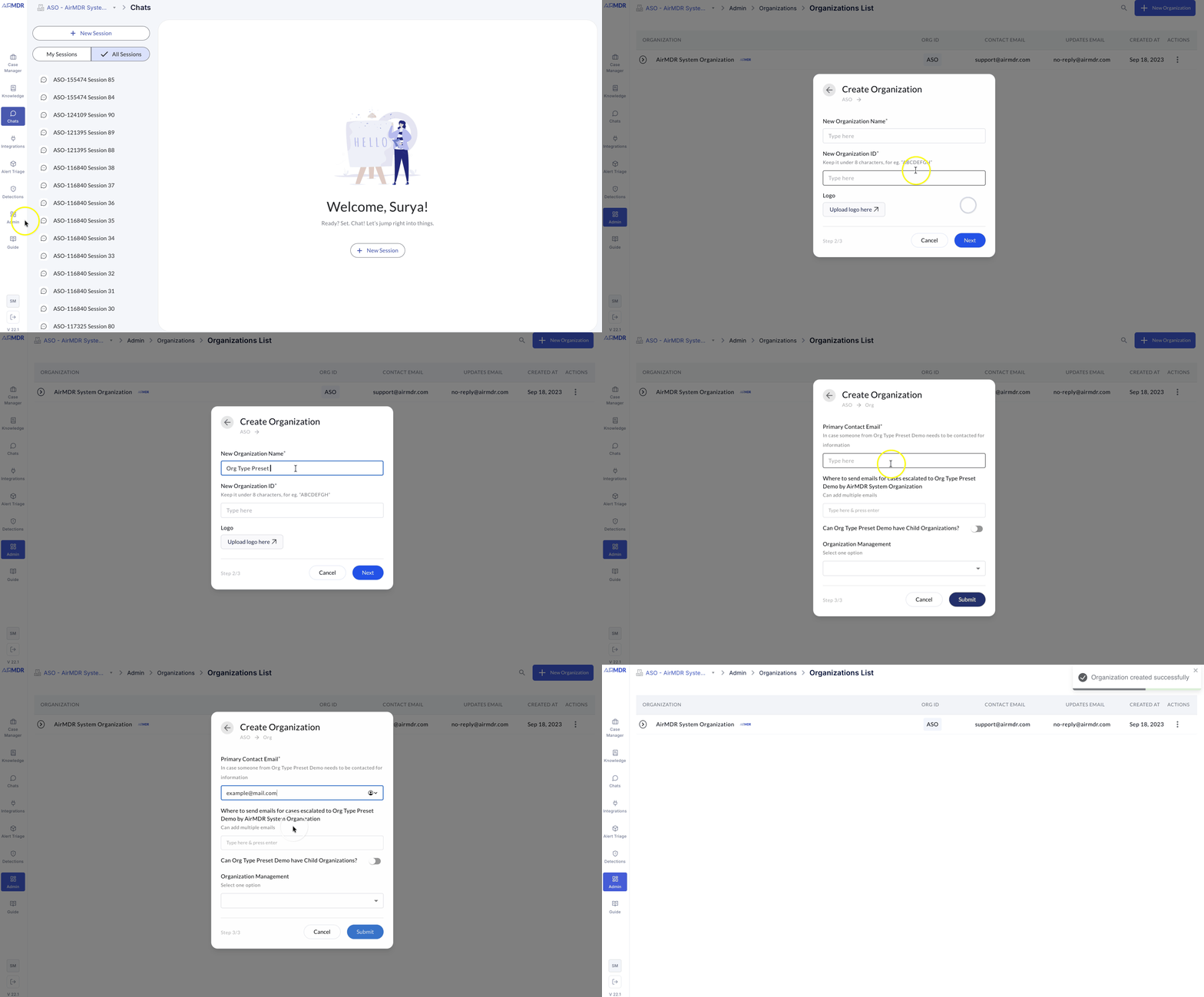
Preset availability and
can_have_child_orgs
- Presets shown at org creation are determined by the structural flag
can_have_child_orgs(this flag is non-editable). - If
can_have_child_orgs = false, the org is a leaf and only leaf-appropriate presets are available. - If
can_have_child_orgs = true, the org can host children and host-capable presets are available.
Roles list and Capabilities
Superadmin (platform scope)- Scope: platform-level administration (outside any single org’s data plane).
- Can: create/re-parent/archive organizations; apply presets; set org-level policy flags at creation.
- Cannot: access org data by default; data access still requires a role within that org and applicable policy flags.
- User & Group Management: create/disable users; assign roles; manage groups.
- Connections: create/update/delete org-local connections; set least-privilege scopes.
- Content Governance: manage playbook scope (Personal/Org/Shared); publish content owned by the org.
- Org Controls: where permitted, adjust org’s policy flags that are editable; context switch to permitted descendants.
- Read/Operate: full read and operational actions as allowed by org policy.
- Alerts & Cases: view alerts; create/update/assign/close cases; add notes/evidence.
- Playbooks: run playbooks; trigger activations where allowed.
- Connections: use approved connections in playbooks.
- Read: dashboards, alerts, cases, execution history; no write actions.
Cross-Organization Policy Flags (what they define)
These flags determine visibility and usage when data or assets cross organizational boundaries:- Parent → Org: Org & User Management —
full_access/no_access
Whether the parent can manage users and org administration tasks in the org. - Parent → Org: Entities —
full_access/no_access
Whether the parent can view/operate on the org’s entities (alerts, cases, playbooks) in accordance with role permissions. - Org → Parent: Connections —
usage_access/no_access
Whether the org can use (execute-only) the parent’s connections. - Org → Parent: LLM Keys —
usage_access/no_access
Whether the org can use the parent’s LLM keys for allowed operations. - Org → Parent: Shared Content —
usage_access/no_access
Whether the org can use (execute/read-only) the parent’s shared playbooks/rules.
Policy Matrices (what they are)
Policy matrices summarize who can see/use what across org boundaries. They do not change role definitions; they determine if cross-org access is visible/usable at all.Effective Access (User × Org)
Access decisions (how the platform evaluates a request)
At request time, AirMDR authorizes an operation by checking:- Role permissions in the target org (does the user’s assigned role allow the action on the resource?), and
- Relevant policy flags if the request crosses org boundaries (does policy allow Full or Usage as required?).
(Internal traversal/resolution details are omitted here as they are implementation-specific.)
Summary
AirMDR applies standard RBAC fundamentals—role assignment, role authorization, and transaction authorization—to a multi-org environment with explicit cross-org visibility flags. Presets (e.g., MDR Service Customer, Free-Tier, MSSP (Managed Security Service Provider) relying on AirMDR for data) provide safe defaults, and access decisions are computed by combining role permissions with parent/child policy scopes in the active organization context.Support
For additional assistance:- Contact AirMDR Support through your designated support channel.