

Audience
What
Why It Matters
Overview
AirMDR uses Darryl, its AI investigation engine, to investigate every alert received by the platform. By default, every alert is analyzed at Level 3 – Deep Dive, the most thorough investigation level. When usage exceeds the applicable weekly allowance, Darryl can apply an appropriate investigation depth to each alert type for the remainder of that week. The recommended depth is based on the alert type’s escalation history in your environment during the previous 30 days. Administrators can review the recommendation and configure a different depth from the Usage Limits page.Investigation Depth Levels
Darryl evaluates how frequently each alert type resulted in a real escalation during the preceding 30 days.Level 1 – Triage
Level 2 – Investigation
Level 3 – Deep Dive
🤔How Darryl Determines Investigation Depth?
Review escalation history
Calculate the recommended depth
Apply Deep Dive by default
Activate adaptive investigation depth
Start a new weekly cycle
Weekly Usage Limit
Each organization has a base weekly usage limit. Under normal usage conditions, every alert receives Level 3 – Deep Dive analysis. The usage limit affects investigation depth only when weekly usage exceeds the organization’s applicable allowance.Within the Usage Allowance
Allowance Exceeded
Weekly behavior
Usage Threshold
The supplied product information states that adaptive investigation depth begins when weekly usage exceeds 150% of the weekly limit.Example calculation
If the weekly limit is 1,000 usage units:Accumulated Usage Credit
AirMDR does not penalize an organization for a single unusually busy week. Unused credit from lower-usage weeks carries forward and increases the organization’s available credit. Accumulated credit can grow to a maximum of five times the base weekly limit.Example
If the base weekly limit is 1,000 usage units:- Darryl applies the configured investigation depth for each alert type.
- The configured depth remains active for the rest of that week.
- Available credit resets to the base weekly limit for subsequent usage periods.
Review or Change Investigation Depth
Administrators can review Darryl’s recommendation and configure a different investigation depth for an alert type.Prerequisites
You have reviewed the alert type’s recent escalation history.
You understand the alert type’s operational and business importance.
Configure an investigation depth
Sign in to AirMDR
- Login using your organization credentials.
- In the Left Navigation pane, click on the ADMIN drop-down.
- Select the Org Config → Usage Limits page.
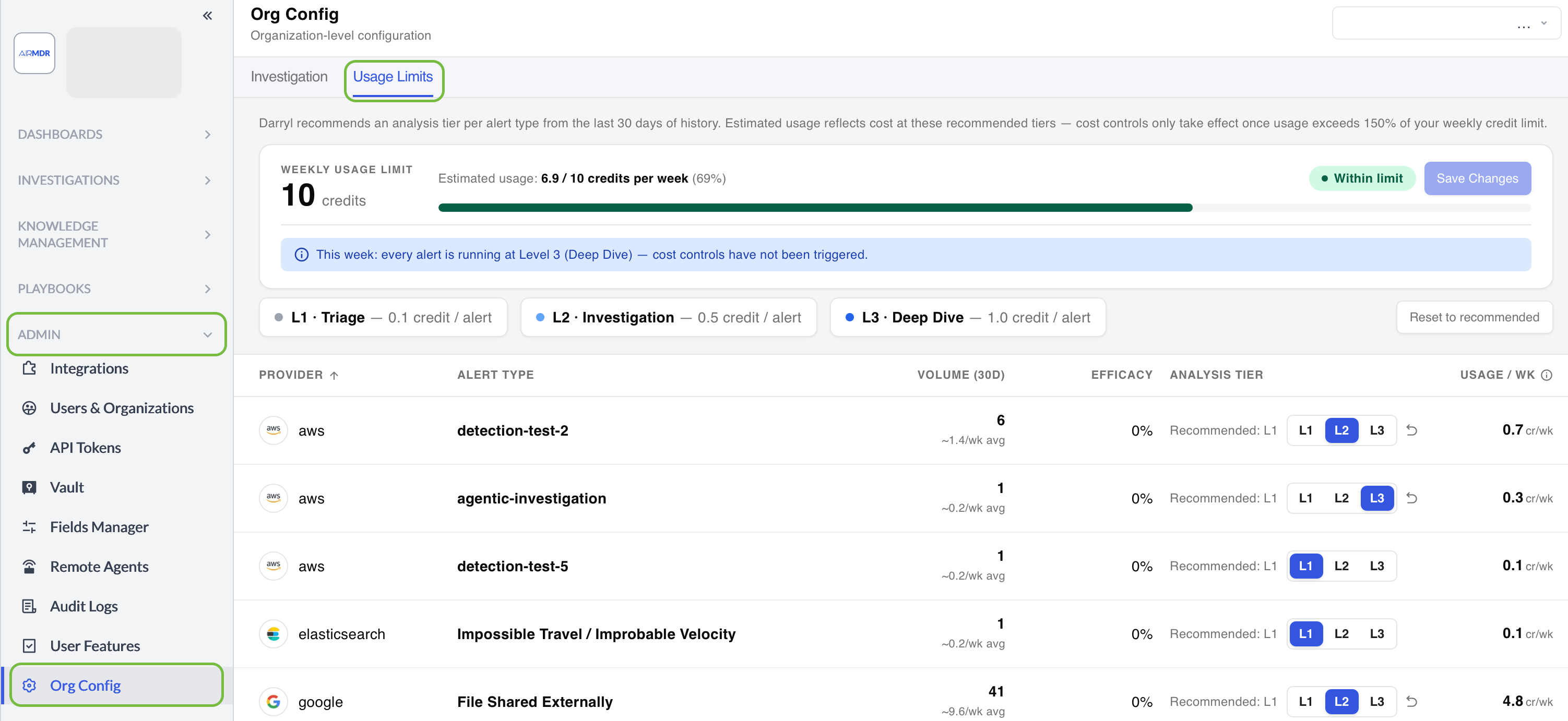
Locate the alert type and Review the recommendation
- Find the alert type whose investigation depth you want to review.
- Compare Darryl’s recommended depth with the currently configured depth.
- Review the following information when available:
- Alert type
- Recommended depth
- Configured depth
- Escalation history
- Usage information
Select an investigation depth
- Select one of the following options:
- Level 1 – Triage
- Level 2 – Investigation
- Level 3 – Deep Dive

- Click “Save Changes” in the top right corner to save the configuration.

- Verify the updated depth.
Confirm that the selected depth is displayed for the alert type.
Expected result
The selected investigation depth is saved as a standing preference for the alert type. The preference remains saved even when Darryl’s recommendation changes as new escalation data becomes available.Recommended Depth vs. Configured Depth
Manual Reinvestigation
When an analyst manually reinvestigates a case, the reinvestigation always runs at Level 3 – Deep Dive.Nothing Is Left Under-Investigated
Even when an alert type is analyzed at a lighter level, it still receives a complete automated AI investigation.Every Alert Is Investigated
Deep Analysis Remains Available
- The alert is ignored.
- The alert is skipped.
- Only a superficial check is performed.
- The alert is excluded from AirMDR investigation.
- An analyst is prevented from performing a deeper review.
Key Behavior Summary
Best Practices
Additional recommendations:- Review alert-type escalation trends regularly.
- Coordinate configuration changes with your SOC team.
- Use manual reinvestigation when closer analysis is required.
- Maintain an audit trail of configuration changes.
- Reassess usage after enabling new integrations or alert sources.
Frequently Asked Questions
Will any of my alerts go un-investigated?
Will any of my alerts go un-investigated?
Does a lighter investigation level mean lower detection quality?
Does a lighter investigation level mean lower detection quality?
What happens if I disagree with Darryl’s recommended depth?
What happens if I disagree with Darryl’s recommended depth?
Will one busy week affect future weeks?
Will one busy week affect future weeks?
How does Darryl calculate the recommended depth?
How does Darryl calculate the recommended depth?
Can Darryl’s recommendation change?
Can Darryl’s recommendation change?
Does my configured preference change when Darryl’s recommendation changes?
Does my configured preference change when Darryl’s recommendation changes?
What depth is used for manual reinvestigation?
What depth is used for manual reinvestigation?
Are alerts skipped after the weekly limit is exceeded?
Are alerts skipped after the weekly limit is exceeded?
Does the configured depth apply permanently?
Does the configured depth apply permanently?
How much unused credit can accumulate?
How much unused credit can accumulate?
What happens after accumulated credit is exhausted?
What happens after accumulated credit is exhausted?
Can I retain Deep Dive for a specific alert type?
Can I retain Deep Dive for a specific alert type?
Does a new week start with reduced investigation depth?
Does a new week start with reduced investigation depth?