Purpose

The GitHub integration allows AirMDR to:
  • Access repository metadata and content information.
  • Enrich investigations with GitHub repository context.
  • Monitor repository-related security events.
  • Support investigations involving source code repositories and development workflows
Method 1: Fine-Grained Personal Access Token (Recommended) Method 2: Personal Access Token (Classic)

Pre-requisites

Set up a new GitHub account:
  • Create a new GitHub account, to avoid an outage to existing organization GitHub users, as a new PAT will be generated.
Mandatory Organization Invite to new users to join GitHub
  • Ensure the new user is invited to the organization. The new user must accept the invitation only to join the organization and the relevant team.

Authentication Methods

AirMDR supports the following authentication methods:
MethodRecommendedDescription
Fine-Grained Personal Access Token✅ YesProvides repository-level access with least-privilege permissions.
Personal Access Token (Classic)SupportedLegacy method with broader repository permissions.

Fine-Grained Personal Access Token

Fine-Grained Tokens provide enhanced security through repository-level scoping and granular permissions.
1

Verify Organization Settings

  1. An organization administrator must enable Fine-Grained Personal Access Tokens.
  2. Navigate to Organization → Settings → Third-party Access → Personal access tokens → Settings.
  3. Configure Fine-grained tokens:
    • Enable Allow access via fine-grained personal access tokens
    • Click Save.
      If Require administrator approval is enabled, generated tokens must be approved by an organization administrator before they can be used.
2

Create a Dedicated GitHub Service Account (Optional)

To avoid interruptions caused by user departures or account changes:
  1. Create a dedicated GitHub user account.
  2. Add the account to your GitHub organization.
  3. Use this account exclusively for AirMDR integrations.
3

Navigate to Fine-Grained Token Creation

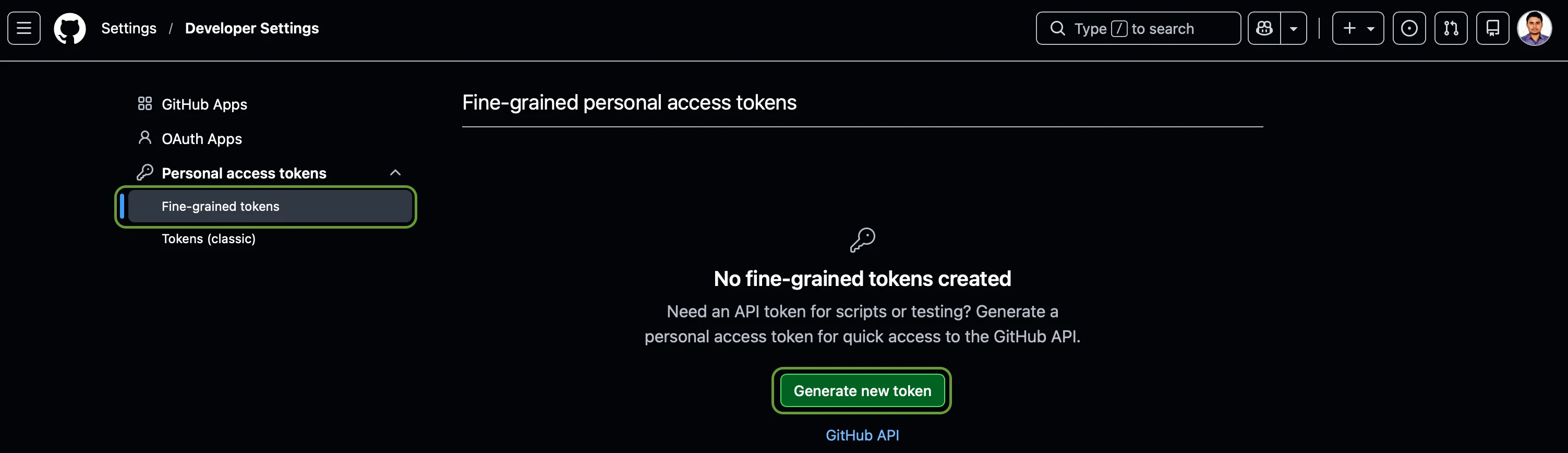
  1. Navigate to GitHub → Developer Settings.
  2. Select the Personal access tokens drop-down in the left navigation pane.
  3. Click “Fine-grained tokens”Generate new token. Git Hub12
4

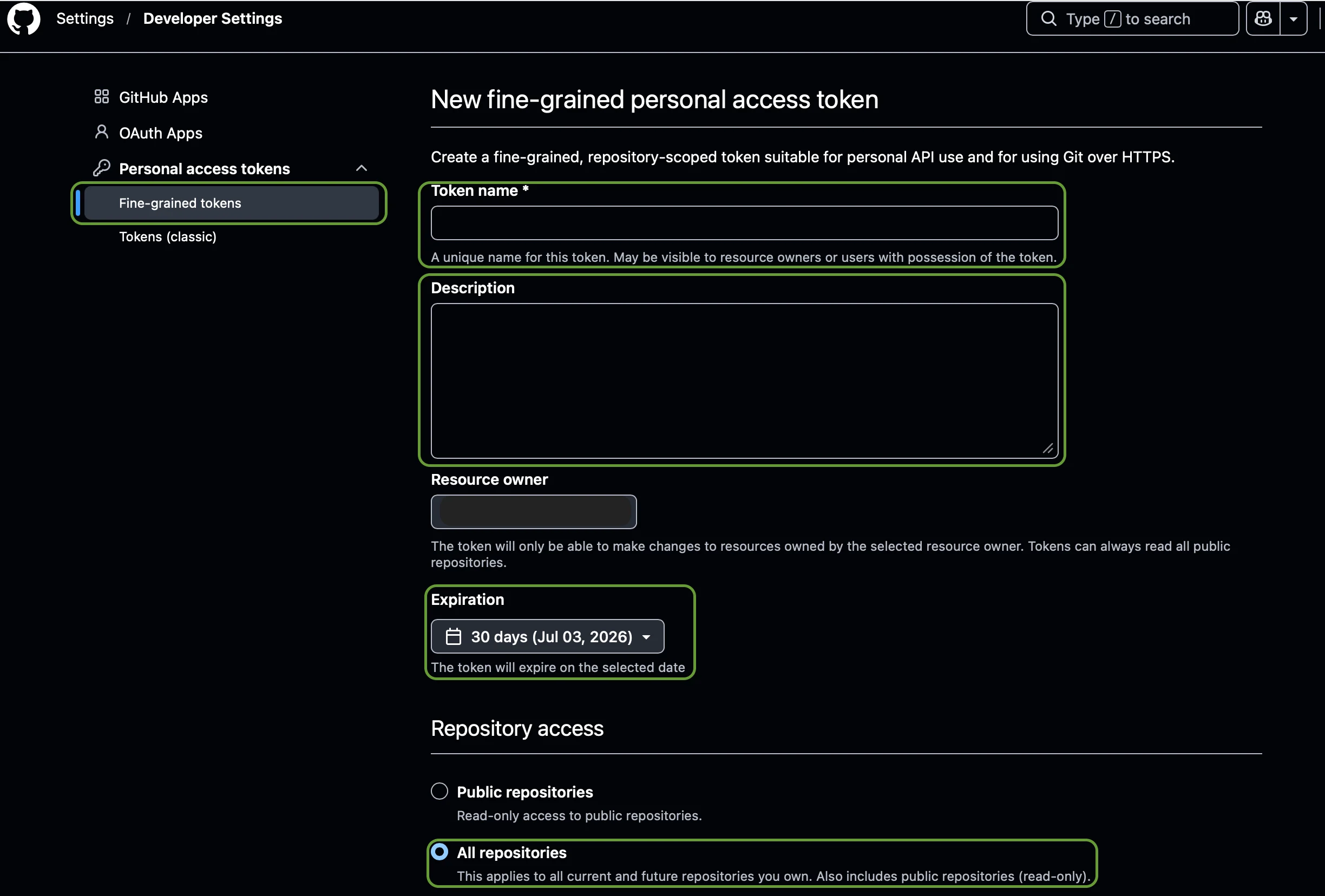
Configure Basic Token Details & Select Resource Owner and Configure Repository Access

  1. Provide:
    FieldValue (Unique name)
    Token NameAirMDR Integration
    DescriptionAirMDR GitHub Integration
  2. Under Resource Owner.
  3. Select your GitHub Organization.
    Example: Resource Owner: MyOrganization
    This ensures the token is scoped to organization repositories.
  4. Select the Expiration as per organizational policy.
    The token will expire on the selected date.
  5. Option A: Choose “All Repositories”.
    Recommended as AirMDR can investigate all repositories.
    Git Hub11 (Or)
    Option B: Selected Repositories.
    Recommended for least-privilege deployments.
5

Configure Required Permissions

  1. Under Repository Permissions, configure:
    PermissionAccess
    MetadataRead-only
    ContentsRead-only
  2. Metadata permission is automatically selected and required by GitHub.
  3. No additional permissions are required.
6

Generate Token

  1. Click Generate Token, and Copy the Token immediately.
Once created, copy and store it in password manager or any relevant vault securely (you won’t be able to see it again).
If administrator approval is required:
  • Submit the token request to the organization administrator.
  • Wait for approval before configuring AirMDR.

Generate GitHub Personal Access Token (PAT)

GitHub PAT increases Security, Fine-Grained Permissions, and fulfills the GitHub compliance policy for HTTPS Authentication.
1

Access GitHub

  1. Login with GitHub with new user credentials.
  2. Navigate to GitHub → Profile (Top right corner) → Settings → Developer Settings.
2

Generate a Personal Access Token

  1. Select the Personal access tokens drop-down in the left navigation pane.
  2. Click Tokens (classic).
  3. Click “Generate new token” and select “Generate new token (classic)”.
  4. Provide a Token name (descriptive name, For Example: “AirMDR Integration”).
  5. Select Expiration:
    • Choose a token lifespan or set it to “Never Expiration”.
  6. Set Permissions:
    • Choose scopes and define the following permissions:
      • repo (Full control of private repositories)
      • read:org (Read-only access to organization, teams, and membership)
      • read:user (Read-only access to profile information)
  7. Generate and Copy the Token:
    Once created, copy and store it securely (you won’t be able to see it again).
3

Securely share GitHub PAT

 Share the token via a secured method to the AirMDR operations team or self-configure in the AirMDR Integrations Dashboard.

Integration Credential Requirements

Use the following values in the AirMDR integration configuration screen:
AirMDR FieldDescriptionFine-Grained Token MethodClassic Token MethodWhere to Obtain
Personal Access TokenGitHub authentication token used by AirMDR to access repository informationGenerated Fine-Grained Personal Access TokenGenerated Personal Access Token (Classic)GitHub → Settings → Developer Settings → Personal Access Tokens
Authentication TypeToken-based authenticationFine-Grained PATClassic PATGitHub
Repository AccessScope of repositories AirMDR can accessAll repositories or selected repositoriesDetermined by token scopesGitHub Token Configuration
Required PermissionsMinimum permissions required by AirMDRMetadata (Read-only), Contents (Read-only)repo, read:orgGitHub Token Permissions
SettingRequired Value
Resource OwnerYour GitHub Organization
Repository AccessAll repositories or selected repositories
Metadata PermissionRead-only
Contents PermissionRead-only
Administrator ApprovalRequired if enforced by organization policy
Important:
AirMDR recommends using Fine-Grained Personal Access Tokens whenever possible, as they provide enhanced security through repository-level access control and least-privilege permissions.

Classic Token Requirements (Legacy)

ScopeAccess Level
repoRequired
read:orgRequired

Example AirMDR Configuration

FieldExample Value
Integration NameGitHub Production
Personal Access Tokengithub_pat_xxxxxxxxxxxxxxxxx
StatusEnabled
GitHub displays the Personal Access Token only once during creation. Store it securely before proceeding with the AirMDR configuration.

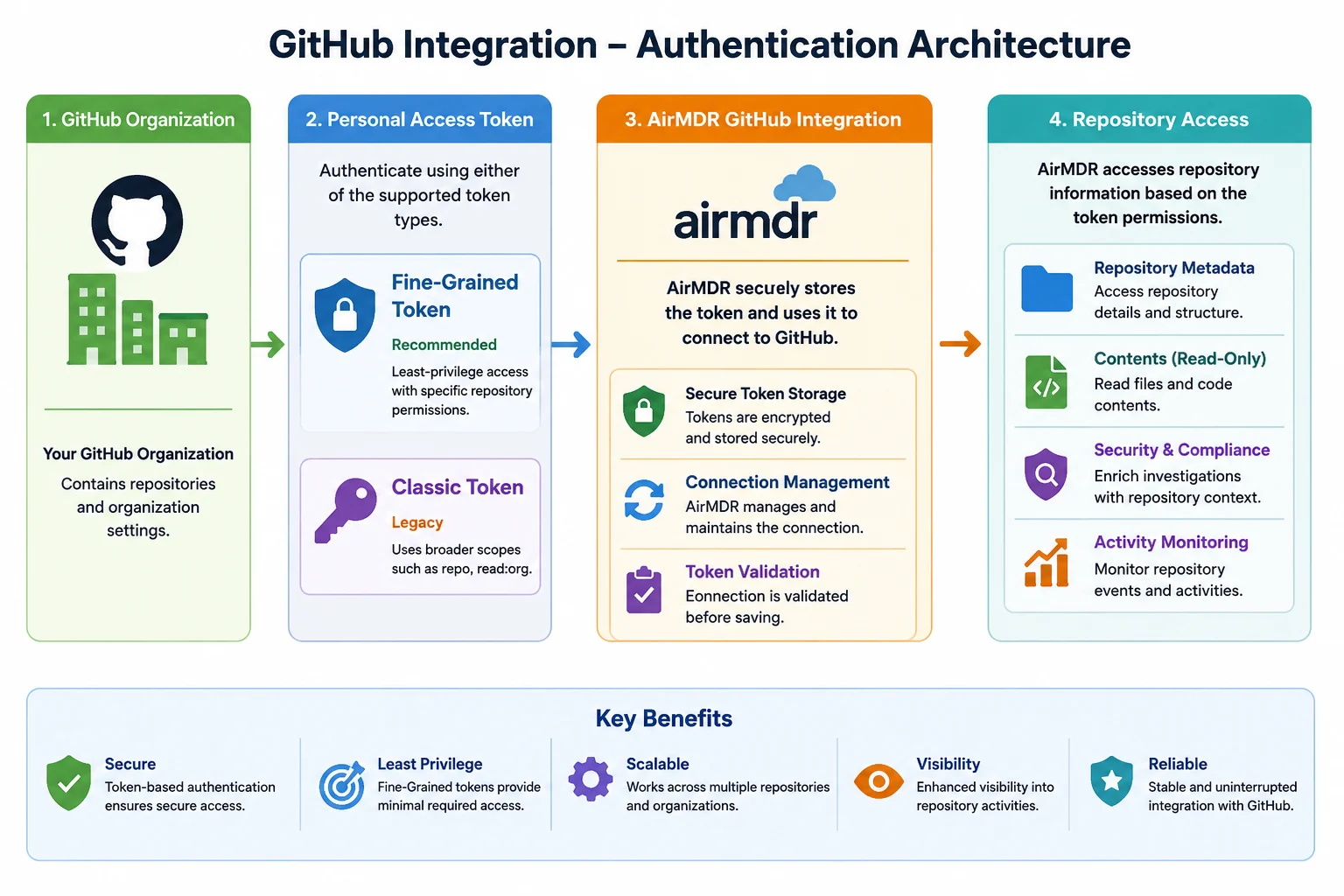
GitHub Integration - Authentication Architecture
Git Hub10

GitHub Credential Reference Table

AirMDR FieldRequiredDescriptionWhere to Obtain
Auth_tokenYesGitHub Personal Access Token used to authenticate AirMDR with GitHub. Supports both Fine-Grained Personal Access Tokens and Personal Access Tokens (Classic).GitHub → Settings → Developer Settings → Personal Access Tokens
Remote AgentNoRemote Agent used when GitHub is accessed through a private network or restricted environment. Select an existing AirMDR Remote Agent if required.AirMDR Remote Agent Configuration
ExpiryRecommendedExpiration date of the generated GitHub Personal Access Token. Used for credential lifecycle management and renewal tracking.Defined during GitHub token creation

Validate Connectivity

Use the following command to verify connectivity and token authentication:
curl -H “Authorization: Bearer <GITHUB_PERSONAL_ACCESS_TOKEN>” \-H “Accept: application/vnd.github+json” \https://api.github.com/user
“login”: “github-user”,“id”: 12345678,“type”: “User”
curl -H “Authorization: Bearer <GITHUB_PERSONAL_ACCESS_TOKEN>” \-H “Accept: application/vnd.github+json” \https://api.github.com/user/repos
If you receive a 401 Unauthorized error, verify that the token is valid and has not expired.
If you receive a 403 Forbidden error, verify that the required repository permissions have been granted and, for Fine-Grained Tokens, ensure the token has been approved by your GitHub organization administrator.

Configure GitHub in AirMDR Integrations Dashboard

  1. Navigate to AirMDR, provide the credentials and click Login
  2. Navigate to the AirMDR Integrations Dashboard in the left navigation pane and select Integrations.
  3. Use the search option, enter the keyword “GitHub”, select the Connections tab, and click + Create button.
  4. Enter an unique name to the Instance (e.g., your org name-GitHub) to easily identify the user connection by AirMDR.
  5. Enter the application credentials like Auth_token in the Authentication Details field params, and click Save.

Skills provided by this Integration

Skill IDPurpose
Get repository events from githubGet list of github repository events for the given organization
Get user actions in githubRetrieve a list of actions performed by a specified user on a given GitHub instance. The output includes events such as push, pull, commit, and other user-generated actions.
GitHub Repository Events for DetectionsRetrieve a list of events from a GitHub repository for detection purposes. The output includes events such as push, pull request, commit, and other repository-generated activities.
GitHub Audit Log Events for DetectionsRetrieve audit log events from a GitHub organization for detection purposes. The output includes events such as member additions, permission changes, repository modifications, and other organization-level audit activities. Requires GitHub Enterprise Cloud license.
To view the details of Input Parameters and Output for the respective skills
  • Go to AirMDR → GitHub Integration page.
  • Select the Skills tab and click on the required listed skills.

Additional Information

ErrorPossible CauseResolution
Invalid credentials providedThe Personal Access Token is incorrect, malformed, or was copied incorrectly.Verify the token value and update the Auth_token field with a valid GitHub Personal Access Token.
Authentication failed (401 Unauthorized)The token has expired, been revoked, or is no longer valid.Generate a new Personal Access Token in GitHub and update the integration configuration.
Access forbidden (403 Forbidden)The token does not have the required repository permissions or has not been approved by the organization administrator.Verify token permissions. For Fine-Grained Tokens, ensure Metadata (Read-only) and Contents (Read-only) permissions are granted and administrator approval has been completed if required.
Repository access deniedThe selected repositories are not included in the token scope.Update the token configuration to include the required repositories or select All repositories during token creation.
Organization access restrictedFine-Grained Personal Access Tokens are disabled for the GitHub organization.Ask a GitHub organization administrator to enable Fine-Grained Personal Access Tokens in organization settings.
Token approval pendingThe organization requires administrator approval before a Fine-Grained Token can be used.Contact the GitHub organization administrator and request approval for the token.
Connection test failedNetwork connectivity issues between AirMDR and GitHub API.Verify internet access, firewall rules, proxy settings, and GitHub API availability.
API rate limit exceededToo many GitHub API requests have been made within a short period.Wait for the rate limit window to reset or use a dedicated service account with appropriate usage limits.
Remote Agent unavailableThe selected Remote Agent is offline or unreachable.Verify that the Remote Agent is running and connected to AirMDR before retrying the integration.
Token expiredThe configured token has reached its expiration date.Generate a new token in GitHub and update the Auth_tokenfield in AirMDR.
The GitHub integration does not generate logs within GitHub specifically for AirMDR connectivity. However, administrators can monitor integration health, token usage, and API access through both AirMDR and GitHub audit logs.

AirMDR Monitoring

After configuring the integration, administrators can monitor:
  • Integration connection status
  • Authentication validation results
  • Repository data synchronization status
  • Integration execution history
  • Error and connectivity notifications
GitHub Audit LogsFor GitHub Organizations, audit logs can be used to track:
  • Personal Access Token usage
  • Repository access events
  • Authentication attempts
  • Organization-level permission changes
  • Token approval activities (Fine-Grained Tokens)
Verify Token ActivityYou can verify that the token is actively being used by reviewing:
  • API authentication events
  • Repository access records
  • Security and audit events
Common Indicators of a Healthy Integration
CheckExpected Result
Connection StatusConnected
Authentication TestSuccessful
Repository AccessAccessible
Token StatusActive
Integration HealthHealthy
SynchronizationSuccessful
If authentication or synchronization issues occur, review the AirMDR integration status first, then verify token validity, repository permissions, and organization approval settings within GitHub.
Follow these recommendations to ensure a secure and reliable GitHub integration with AirMDR.

✅ Do’s

Best PracticeDescription
Use Fine-Grained Personal Access TokensPrefer Fine-Grained Tokens over Classic Tokens to enforce least-privilege access.
Create a Dedicated Service AccountUse a dedicated GitHub account for AirMDR integrations to avoid disruptions caused by employee account changes.
Grant Minimum Required PermissionsAssign only the permissions required by AirMDR (Metadata: Read-only, Contents: Read-only).
Restrict Repository AccessLimit token access to specific repositories whenever possible.
Rotate Tokens RegularlyPeriodically regenerate and update tokens according to your organization’s security policy.
Set Token Expiration DatesConfigure expiration dates to reduce the risk of long-lived credentials.
Monitor Audit LogsRegularly review GitHub audit logs for token usage and repository access activities.
Securely Store TokensStore tokens in approved secrets management systems and avoid exposing them in documentation or source code.
Review Token Permissions PeriodicallyConduct regular access reviews to ensure permissions remain appropriate.
Enable Administrator ApprovalUse token approval workflows where supported to improve governance and oversight.

❌ Don’ts

AvoidReason
Don’t Use Personal User AccountsIntegration failures may occur if the user leaves the organization or changes permissions.
Don’t Grant Unnecessary PermissionsExcessive permissions increase security risks and violate the principle of least privilege.
Don’t Share Tokens Over Email or ChatTokens are sensitive credentials and should only be stored in secure locations.
Don’t Commit Tokens to RepositoriesTokens exposed in source code can be abused and may require immediate revocation.
Don’t Disable Token ExpirationLong-lived credentials increase the impact of credential compromise.
Don’t Use Classic Tokens for New DeploymentsFine-Grained Tokens provide better security controls and repository-level access restrictions.
Don’t Ignore Failed Authentication AlertsAuthentication failures may indicate expired, revoked, or compromised tokens.
Don’t Grant Access to All Repositories UnnecessarilyLimit access only to repositories required for AirMDR investigations.
Don’t Reuse Tokens Across Multiple ApplicationsUse a dedicated token specifically for the AirMDR integration.
Don’t Leave Unused Tokens ActiveRevoke unused or obsolete tokens immediately to reduce attack surface.
Security Recommendation For production environments, AirMDR recommends using a dedicated GitHub service account with a Fine-Grained Personal Access Tokenrepository-specific access, and read-only permissions to align with security best practices and the principle of least privilege.
  • 📧 Contact AirMDR Support through your designated support channel.
  • 🔁 Rotate credentials regularly. Regular maintenance of the GitHub integration helps ensure uninterrupted connectivity, secure access, and reliable repository monitoring.
Maintenance Activities
ActivityRecommended Frequency
Verify integration statusWeekly
Review token expiration datesMonthly
Validate token permissionsQuarterly
Review GitHub audit logsMonthly
Rotate Personal Access TokensAs per organizational security policy
Remove unused tokensImmediately when no longer required
Review repository access scopeQuarterly
Validate Remote Agent connectivity (if used)Monthly
The GitHub integration uses a GitHub Personal Access Token (Fine-Grained or Classic) to securely authenticate AirMDR and retrieve repository information required for investigations and enrichment activities.Data ExchangedThe integration may access the following information based on the permissions granted to the Personal Access Token:
Data TypePurpose
Repository MetadataRetrieve repository names, IDs, descriptions, visibility, and ownership details.
Repository ContentsAccess repository file and content information for investigation and enrichment workflows.
Organization InformationRetrieve organization-level repository associations and ownership information.
Repository Activity DataSupport security investigations and contextual analysis.
AirMDR only accesses the resources permitted by the configured GitHub Personal Access Token.
Security Controls
Security ControlDescription
Token-Based AuthenticationAirMDR authenticates using a GitHub Personal Access Token.
Least-Privilege AccessFine-Grained Tokens allow repository-specific and read-only permissions.
Encrypted CommunicationAll communication between AirMDR and GitHub APIs occurs over HTTPS/TLS.
Secure Credential StorageTokens are stored securely within AirMDR’s credential management framework.
Access ControlRepository access is limited by the permissions configured on the GitHub token.
Encryption
Data StateProtection Method
Data In TransitTLS 1.2+ / HTTPS
Stored CredentialsEncrypted within AirMDR credential storage mechanisms
API AuthenticationGitHub Personal Access Token
Network Requirements
ComponentPortProtocol
GitHub API443HTTPS
AirMDR Platform443HTTPS
GitHub API EndpointThe integration communicates with GitHub using the GitHub REST API: https://api.github.comAccess Model
Authentication MethodSupported
Fine-Grained Personal Access TokenYes
Personal Access Token (Classic)Yes
Security Recommendation AirMDR recommends using Fine-Grained Personal Access Tokens with Metadata (Read-only) and Contents (Read-only) permissions to align with the principle of least privilege and minimize security exposure.